Menu | Edit > Track Lines > Classify |
Distinguish between line types using classification flags.
Interface
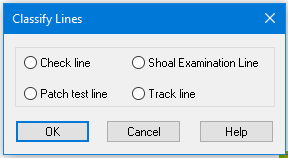
Use this dialog box to set or change a classification flag for a track line.
|
|
Check Line | A line that is run perpendicular to the survey and is used to check the validity of survey data. |
Patch Test Line | A line that is run over a surveyed area to calibrate sensor and sonar offsets. |
Shoal Examination Line | A line that is run over a surveyed area to re-check possible shoals on the sea floor |
Track Line | A line that is part of the main survey grid. |
Procedure
1. Make sure the Ship Track Lines layer is selected in the Layers window.
2. Select a track line in the Display window or Control window.
3. Select the Classify Lines command.
4. Select an option for setting the line classification flag.
5. Click OK.
The line is now flagged according to one of four categories