Interface
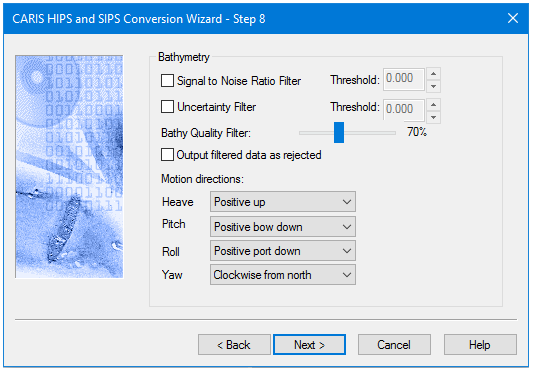
Options for converting Klein bathymetry data to HIPS are displayed in this dialog box.
Option | Description |
Signal to Noise Ratio Filter | Enable check-box to filter according to the signal to noise ratio (SNR) value stored during data collection. |
Threshold | Select the value above or below the stored SNR value to filter by. • If the data has a smaller SNR than specified in the Threshold field, it is then converted and flagged as Rejected. • Minimum/maximum threshold settings are -50.0/50.0, respectively. |
Uncertainty Filter | Enable the check-box to filter according to the Uncertainty value during data collection. |
Threshold | Select the value above or below the stored uncertainty value to filter by. • If the data has a smaller uncertainty than specified in the Threshold field, it is then converted and flagged as Rejected. • Minimum/maximum threshold settings are 0.0/1.0 respectively. |
Bathy Quality Filter | Use the slider to set a value between 50 and 100%. • If the stored quality value is below the set value it will be rejected, when the Output filtered data as rejected option is set. Otherwise it is not converted. The default value is 70%. |
Output filtered data as rejected | Enable the check-box to include the data filtered by the Bathy Quality Filter in the converted dataset. The data will be marked as Rejected. |
Motion directions | Select the directions that Heave, Pitch, Roll and Yaw data stored in the SDF file when created by the Klein SonarPro®software. |
3. Click Next to continue the conversion process