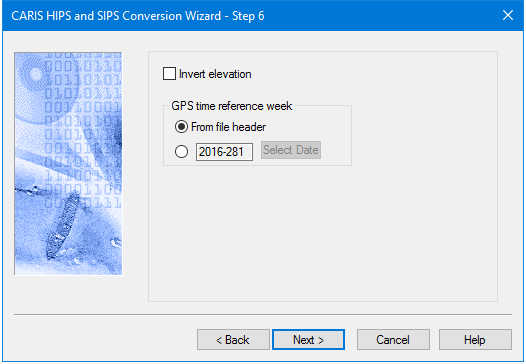
LAS files can contain either elevation or hydrographic data. Conversion step 6 for LAS data offers the option to invert the “Z values” from positive to negative, and vice versa, so that the Z‑axis is changed to match the HIPS positive down depth convention. By default this option is turned off.
GPS time reference week
LAS data that stores time as GPS seconds of the week stores the survey date in the file header. However, if the survey date was recorded incorrectly, it can be overridden by selecting the correct date using the GPS time reference week option.
Reference weeks are time-stamped in GPS seconds, starting at 0 at midnight on Sunday. The default setting is to take the date from the file header. Another reference week can be set, but this option is not used during conversion if the LAS file stores timestamps using the “standard” format, which is the actual number of seconds from 6-Jan-1980.
NOTE: The LAS data format can store coordinates using the ground or geographic system. If geographic coordinates are stored, the data file should contain a “Coordinate System” record, stating this fact. If no Coordinate System record is found, the converter will assume ground coordinates have been used. If coordinates have been stored as geographic, but no Coordinate System record is present in the file, the data will be interpreted as with ground coordinates. To resolve this, select “Geographic (Lat/Lon)” from the Projection list in the Navigation Coordinate Type dialog box (Step 4), then select an appropriate zone, such as “World Geodetic System 1984” (WG84). |
Reference week
By default, reference weeks are time-stamped in GPS seconds, starting at 0 at midnight on the start day. By default the start day is Sunday, but this can be changed. For example, if the survey week runs from Wednesday to Tuesday, Wednesday can be set as the start day for the survey week. Sunday is “rolled over” and data for the full survey week is applied.
The LAS format stores GPS time as Absolute GPS time, the seconds elapsed since January 1st 1980.
Interface
Options for converting LAS data to HIPS are displayed in this dialog box.
Procedure
1. Select the check box to invert the Z values from positive to negative.
2. To set a specific reference week, select the button beside the date field, and click Select Date.
3. Select the reference date from the calendar picker.
4. Click Next to continue the conversion.