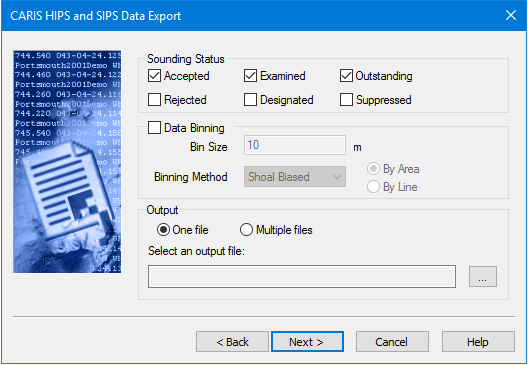
Each sounding in a cleaned HIPS dataset is stored with bits that determine the status of that sounding. You can choose to restrict the export process to soundings with specific status flags.
1. To export soundings with a specific status flag, select the appropriate Sounding Status check boxes.
2. To apply a data thinning function, select the Data Binning check box.
The Data Binning option divides the survey area into a grid and selects either the shoal- or deep-biased soundings from each cell for export. The Bin Size option sets the size of the grid cells.
3. Type the size for the grid cell in the Bin Size field. The units used here can be changed in the Tools > Options > Display >Units dialog box.
4. Select either the Shoal-Biased or Deep-Biased options to export only the shoalest or deepest soundings, respectively, to the ASCII file.
5. Select the By Area option to export one sounding per bin.
6. Select the By Line option to process each line, and export a sounding for each line per bin. Where line data overlaps this method can give multiple soundings per bin.
7. Select an output location for the data. Select One File to export all data to a single file or select Multiple Files to export data to separate files for each survey line.
• If you select One File, type a name and file path for the ASCII file, or click Browse to select a location and name for the file.
• If you select Multiple Files, click Browse to select a folder to save the files. The files are automatically named according to Project_Vessel_Date_SurveyLine.
8. Click Next.