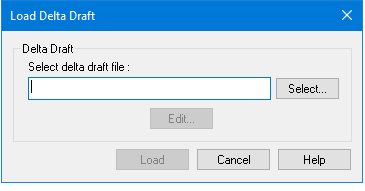
Menu | Process > Load > Delta Draft |
The Load Delta Draft function lets you import your model for dynamic changes in draft and have these changes applied to the soundings during the Merge process. Delta Draft represents a change in draft that is positive as draft increases and negative as draft decreases. The data, which is loaded from a ASCII text file, overrides the Dynamic Draft information in the vessel file. The Delta Draft value is interpolated between time stamps in Merge and added to the Observed Depth to obtain the Final Depth.
The input format for the Delta Draft text file is similar to the COWLIS tide format. Each record is in the following format:
YYYY/MM/DD HH:MM:SS.SSS 1.234
The Delta Draft function can also be used to load recorded depth versus time data for an underwater platform on which the multibeam sonar is mounted, such as a ROV (Remote Operated Vehicle) or AUV (Autonomous Underwater Vehicle), or a towed vehicle.
Procedure
1. Select the track line(s).
2. Select the Load Delta Draft command.
3. Type the path of the file or click Select to locate the file.
4. To make changes to the file, click Edit.
The file is opened in the default text editor (such as Notepad). Make any changes and save the file.
5. Click Load.
The delta draft is loaded into the line folder.