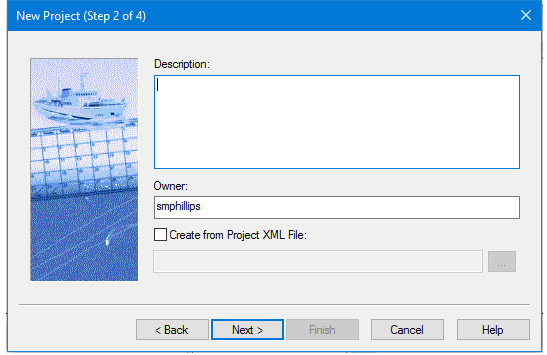
Enter project information and continue with the next step in the wizard, or select a pre-defined XML metadata file from which to create the project.
The project metadata XML file must follow the format of the HIPS configuration file or “schema”, samples of which can be found in the folder: HIPS\ver\System\Schemas.
Alternatively if you have an XSLT file, HIPS can use that to translate the XML. In order to use this function, the HIPS Program XML Transform variable in Tools > Options >Files and Folders must be set to the location of the XSLT file.
Procedure
1. [Optional] Type comments or identifying information about the project into the Description field.
2. [Optional] Type the name of the person working with the project data in the Owner field. The default name that is displayed is taken from the current Windows log-on name.
3. Click Next to set further options in Step 3.
Procedure: using XML metadata file
1. [Optional] Add information as in step 1 and 2, above.
2. Select the Create from Project X ML File check box, to create the project using an XML metadata file.
3. Click Browse.
4. In the Select Project XML File dialog box, navigate to and select the XML file.
5. Click Open to display the path and name of the selected XML file in the Step 2 dialog box.
6. Click Finish.