The gyro sensor refers to any device providing a heading orientation of the vessel.
1. Click Gyro in the Sensors list box to highlight the selection and display the gyro data fields.
2. Type data as needed in the following fields:
• Date: The year and Julian day of the current gyro sensor time stamp.
• Time: The hour and minute of the gyro sensor time stamp.
• Time Correction: The time correction value.
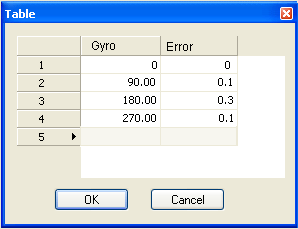
The Gyro Error is measured in degrees and is the difference between the recorded sensor value and the applied heading of the vessel:
Applied Heading = Recorded value - Gyro Error.
3. Click an Edit button in the Error column to open the Gyro Error Table.
4. Type new values in the Gyro and Error fields and click OK.
The Error Table is closed.
5. Type data as needed in the following fields:
• Manufacturer: The maker of the sensor equipment.
• Model: The particular make of sensor equipment.
• Serial Number: The serial number of the sensor equipment.