Menu | Edit > Vessel Shape |
Tool |
|
Create a 3-D outline of the vessel, by defining its length, width and height, as well as the position of the reference point in the vessel.
You can also revise an existing vessel outline.
1. Open the vessel file if it is not already open.
2. Select the Vessel Shape command.
Menu | Edit > Vessel Shape |
Tool |
|
The Plan View Shape dialog box is used for entering width and length of the vessel.
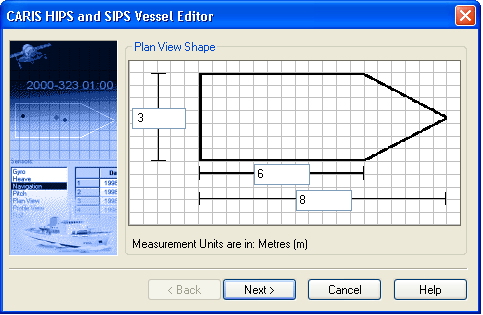
1. Enter a width for the vessel in metres, measured from port to starboard.
2. Enter vessel length for the vessel from stern to the base of the bow.
3. Enter the length from the stern to the tip of the bow.
4. Click Next.
The Plan View PR dialog box is displayed. It is used to set the position of the Reference Point (RP).
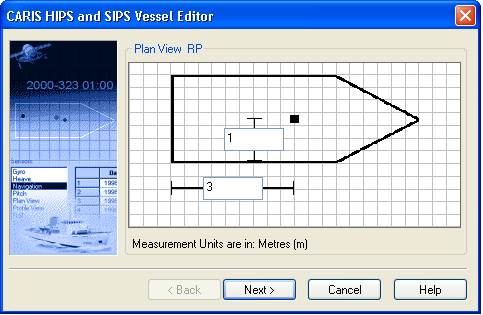
1. Type the distance from the stern to RP.
2. Type the distance from the starboard side to the RP.
3. Click Next.
The Profile View Shape dialog box is displayed.
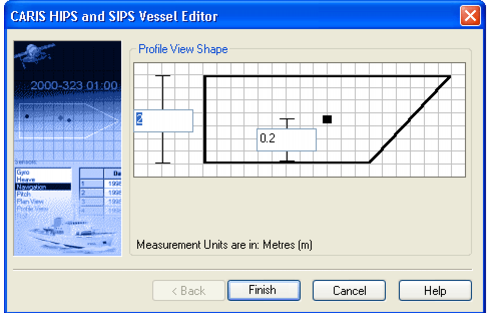
Set the height measurements for the vessel:
1. Type the height of the vessel.
2. Type the height of the vessel RP from the keel.
3. Click Finish.
The outline of the vessel is displayed in Vessel Editor.
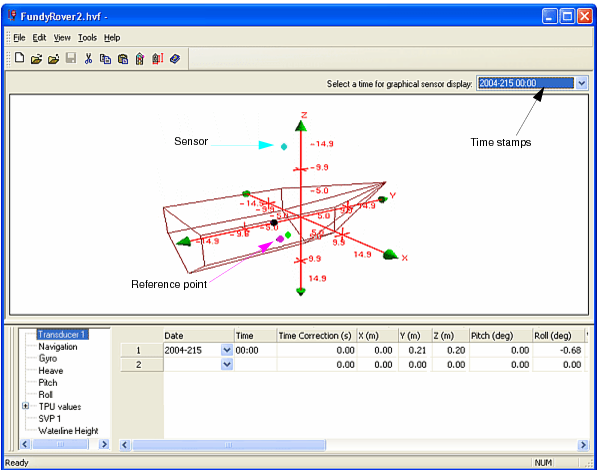
Negative values are used for these measurements:
• from the origin (crosspoint of the axes) to port on the X axis,
• from the origin aft towards the stern on the Y axis,
• from the origin point up, on the Z axis.
Negative values on the axes are displayed with a minus sign (-).
