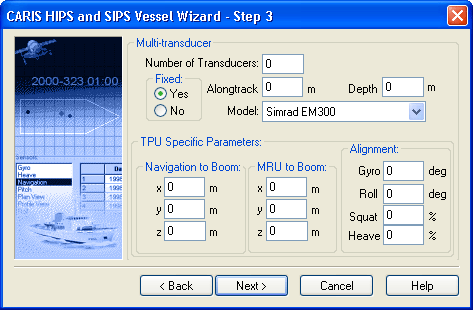
If you selected Multi-transducer in the Step 2 dialog box, you now enter information on the number and types of transducers and for TPU specific parameters.
1. Enter the Number of Transducers on a boom.
2. Select Yes if the transducers are mounted to a fixed boom or to the hull of the vessel, or select No if the transducers are on a movable (decoupled) boom.
3. Type the default Alongtrack value of all the transducers relative to the ship's reference point.
4. Type the default Depth of all the transducers relative to the ship's Reference Point.
5. Select the sonar model from the Model drop-down list.
Parameters for navigation to boom and motion recording unit (MRU) to boom are necessary to calculate Total Propagated Uncertainty.
6. Type the distances from the positioning system to the centre of the boom in the Navigation to Boom X-Y-Z fields.
7. Type the distance from the motion recording unit to the centre of the boom in the MRU to Boom X-Y-Z fields.
The Roll and Gyro misalignment values are needed for fixed-boom system. However, for a decoupled boom, only a Gyro misalignment value is needed.
The Squat and Heave percentage values are transducer responses to overall heave and squat. For fixed-boom transducers this should be 100% and less than 100% for decoupled-boom transducers.
8. Type a degree offset in the Roll and Gyro fields.
9. Type a percentage value in the Squat and Heave fields.
10. Click Next.
Continue with Configuration Options.