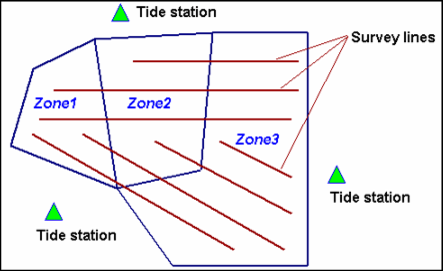
When tide observations from multiple tide stations are applied to a line or lines, tide zones are used.
Where a survey line falls within two or more tide zones, the tide data to be loaded for each part of a line is determined by the zone in which that part of the line falls (as illustrated below).
The tide data file must span the entire time frame of the track line. The time zone of the tidal observation data must match the time zone of the survey data to which it will be applied.
The output from the Load Tide function (see Import Tide (Load Tide)) attaches a binary HIPS tide-time series to each track line.
The tide zone option assigns tide observations to track lines from multiple tide stations based on the time period in defined geographic zones.
Each tide zone is defined by a closed polygon with tide, time and range corrections for a primary station, plus up to three backup secondary tide stations. Tide zone should not overlap each other.
HIPS uses a Zone Definition File (with the extension *.zdf) for defining tide zone data. This is an ASCII file and can be prepared with any text editor.
For complete description of the ZDF format, see Tide Zone Definition Files.