In the 3D View window, rotation along the X-Y-Z axis is handled by moving the arrow heads at the ends of the compass. 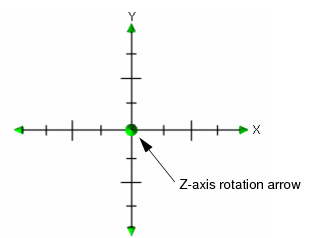
In the 3D View window, rotation along the X-Y-Z axis is handled by moving the arrow heads at the ends of the compass.
1. To rotate the image along the Z-axis, position the cursor on the middle arrow head, press and hold the mouse button, and drag the cursor so that the image is rotated. The compass can be rotated 90º.
2. To rotate the image along the X-Y axis, position the cursor on any of the other arrow heads, press the mouse button and drag the arrow head in a left-right or up-down direction. The compass can be rotated 360º.
3. Alternatively, the image can be rotated in the horizontal plane by grabbing the Z-arrow, then pressing the left-mouse button and moving the cursor up and down. Rotation around the Z-axis can be performed by pressing the <Shift> key and moving the cursor left and right in these windows.
The image is rotated in the same direction as the arrow heads.
4. To return the image to its original position, click Overview in the
3D View tab.
The image is restored to its original position.