 CARIS HPD Paper Chart Editor
 CARIS HPD Paper Chart Editor
This command is only available if the Raster Chart Module is enabled. |
Menu | Raster > Export Raster Differences |
Export changes in a raster chart to difference files – one showing new material and the other showing deleted material. Difference files are saved in TIFF files that serve as a record of a chart’s development from one iteration to the next.
Additions and deletions in an open raster chart are compared against a reference chart or layer after Compare Chart and Compare Files commands have been applied.
Two export options are available:
• Show changes to all layers in a raster set. Additions and deletions on each layer are highlighted using specific colours.
• Show changes to a single layer. Two files are created: a file showing additions in a single layer and a file showing deletions in a single layer.
The parameters for the TIFF files are determined by a raster difference rule file. This is an XML file with a .rasdiff extension. The file sets:
• layers to be exported
• names for the TIFF files
• colours to represent additions and deletions.
An example of a raster difference file is shown below.
<?xml version=”1.0” encoding=”UTF-8”?> |
<CARIS_RASTER_DIFFERENCING version=”1.0”> |
<configuration type=”TwoFilesPerRasterSet” addition_suffix=”NEW” deletion_suffix=”DEL”/> |
<layer name=”BUFF” addition_colour=”RGB(255,165,0)” deletion_colour=”RGB(0,255,0)”/> |
<layer name=”BATY” addition_colour=”RGB(255,0,0)” deletion_colour=”RGB(255,165,0)”/> |
<layer name=”AIDS” addition_colour=”RGB(255,192,203)” deletion_colour=”RGB(173,216,230)”/> |
<layer name=”BLPN” addition_colour=”RGB(173,216,230)” deletion_colour=”RGB(144,238,144)”/> |
</CARIS_RASTER_DIFFERENCING> |
Raster difference files are not included in the installation. You will need to create your own. For information on these files, see Support Files.
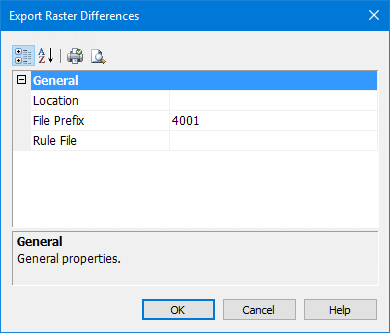
When the files are created, file names are determined by the file prefix that is set in the Export Raster Differences dialog box and in the suffix in the raster difference file. For example:
• Prefix for the files: MyLocation
• Suffix for the files is DEL (for removed features) and NEW (for new features)
The file names for the raster difference TIFF files are MyLocation_DEL.tif and MyLocation_New.tif.
Related commands:
• • | • |
Interface
Property | Description |
|---|---|
Location | The folder for storing the raster difference TIFF files. 1. Click Browse. The Browse for Folder dialog box is displayed. 2. Select a folder to save the files and click OK. |
File Prefix | The first part of the raster difference TIFF file name. Type a new prefix name, if necessary. |
Rule File | The raster difference file that defines what layers are exported and the colour that show additions and deletions. 1. Click Browse. The Windows Open dialog box is displayed. 2. Select the file and click Open. |
Procedure
1. Select the Raster Set layer or a single raster layer.
2. Select the Export Raster Differences command.
The Export Raster Differences dialog box is displayed.
3. Set any necessary options.
4. Click OK.