 CARIS HPD Paper Chart Editor
 CARIS HPD Paper Chart Editor
CARIS HPD Product Editor
CARIS HPD Source Editor
CARIS S-57 Composer
CARIS Paper Chart Composer
Menu | Help > Catalogue Browser > Attributes |
View information on feature attributes in the Objects dictionary.
Related commands:
• | • |
Interface
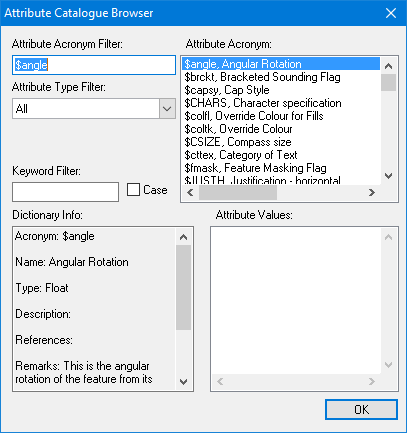
Option | Description |
|---|---|
Attribute Acronym Filter | Type the first few letters of the acronym you are looking for. The Attribute Acronym list changes to match. |
Attribute Type Filter | Select an attribute type from the list: • Alphanumeric • Date • Enumerated • Float • Integer • List • Multimedia • Raster • String • Text • All The Attribute Acronym list changes to match the selected type. |
Keyword Filter | Filter on all fields that define the acronym. The Attribute Acronym list changes to display acronyms that contain your text anywhere in the definition. Case: • On: The filter is case sensitive. • Off: The case of the search term will be ignored. |
Attribute Acronym | The list of acronyms. This list changes as you use the filter options. Click on a item in this list to display its data in the Dictionary Info box. |
Dictionary Info | The acronym information. The information includes a description, attributes, and remarks. Information about attributes includes name, type, and values. |
Attribute Values | A list of possible values for the selected acronym, if it is an enumerated or list type. |
Procedure
1. Select the Attribute Catalogue Browser command.
The Attribute Catalogue Browser dialog box is displayed.
2. Set any necessary filters.
3. Select an attribute acronym.
Information about the selected acronym is displayed in the Dictionary Info box and the Attribute Values box.