 CARIS HPD Paper Chart Editor
 CARIS HPD Paper Chart Editor
CARIS HPD Product Editor
CARIS HPD Source Editor
CARIS S-57 Composer
CARIS Paper Chart Composer
Pop-up | Line Digitizer > Geodesic |
Pop-up | Area Digitizer > Geodesic |
A geodesic line is the shortest possible distance between two points. For example, with a global map view, a geodesic line with two points, one in Whitehorse, Canada and one in Oslo, Norway would be drawn as a straight line crossing the Arctic circle as opposed to being drawn parallel to a line of latitude.
The Digitize Geodesic Line command can be used when you create a line or area.
Related commands:
• | • |
Procedure
1. Select a Geodesic command.
2. Click once at the location of the first point (1).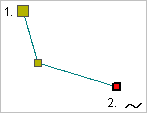
3. Do one of the following:
• Click at the location of the second point.
• Press and hold the mouse button and drag the second point to its location then release the button.
4. Continue until all points are added.
5. Select the End Line or Close Line command..
Close line joins the first point in the line to the last point.
The new line feature is created.