 Catalogue Editor
 Catalogue Editor
Menu | Edit > Add-Remove Object |
Tool |
|
Assign objects in a database or XML dictionary to a profile. Objects that are associated with an open profile can be removed.
A database or XML catalogue must be open in order to apply this command.
Related commands:
• • • • • • | • • • • • • |
Procedure
1. Select the Add-Remove Objects command.
The Profile Object list is displayed with a list of available and assigned objects.
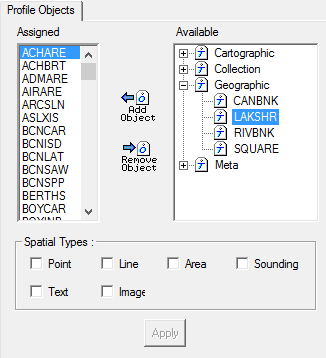
The objects in the Available list are in the dictionary but are not assigned to a profile. Objects in the Assigned list have been assigned to a profile.
2. Add or remove objects. See table below.
Command | Description |
|---|---|
Add Object
| Assign an object to the profile. 1. Select an object in the Available list. 2. Select a Spatial Type. 3. Click Add Object. The object is moved to the Assigned list. |
Remove Object
| Remove an object from the profile. 1. Select an object in the Assigned list. 2. Click Remove Object. The object is moved to the Available list. |
3. Click Apply.


