The following is an example of an elevation type format information file in the delimited format: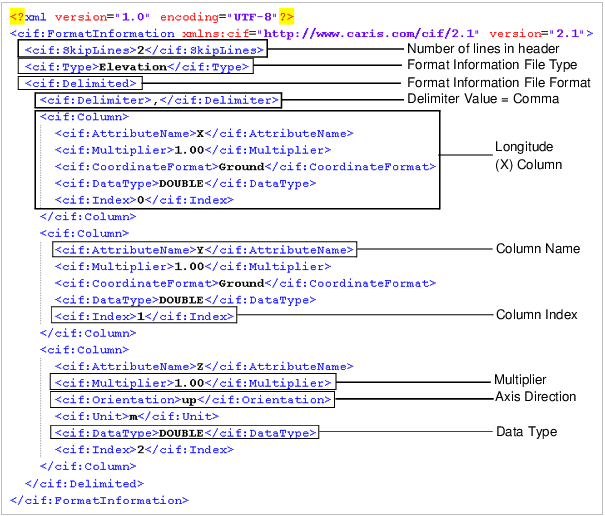
The ASCII Info File Editor is used to create and edit format information files. Format information files are XML files that contain the position and attribute information for ASCII datasets being imported into BASE Editor. The file extension for format information files can be either .xml or .info.
These files are used to map the text in an ASCII file to attribute values for the surface being created. For example, the first three attributes defined in the format information file generally reference the latitude, longitude and Z values for each point in the dataset.
The information provided in a format information file varies greatly depending on the task at hand and the data available. Some files may simply provide the positional attributes, while others may define additional attributes available in the source dataset (e.g., Uncertainty, Temperature).
Two different types of format information files can be created:
• Elevation: This type used if opening or importing a file containing XYZ data.
• Navigation: This type used if creating a file for data containing location and time values. Navigation files are meant to be used in CARIS HIPS & SIPS only.
In addition to the file type, there is also an option for the file format. There are two formats available, "Fixed" and "Delimited", which are described in more detail below.
The following is an example of an elevation type format information file in the delimited format:
Fixed Format Information Files
A fixed format information file is used if the source data file has no delimiter between the attribute values. With this method, data is mapped according to the "Start" and "Width" values defined for each attribute column in the file.
<cif:FixedWidth> <cif:Column> <cif:AttributeName>X</cif:AttributeName> <cif:Multiplier>1.00</cif:Multiplier> <cif:CoordinateFormat>Ground</cif:CoordinateFormat> <cif:DataType>DOUBLE</cif:DataType> <cif:Start>0</cif:Start> <cif:Width>10</cif:Width> </cif:Column>
|
Using the "Start" and "Width" values, each character in a line is numbered and the number of characters in each attribute value is used to identify a column. The characters in the line are numbered from left to right, starting with 0 and continued until the end of the line. For example, a line with 6 attribute columns might have 70 characters.
Below is an example of a line from an ASCII file with no delimiter character. The red lines indicate where each attribute value starts and stops.

In the example, the first attribute column would have a start value of 0 with a width value of 10 because there are 10 characters in the X (Longitude) value. The second column (Y or Latitude) would start with the next consecutive number, making the start value 10. It has a width value of 11, taking up characters 10 to 20 in the array of numbers. The start value of the third column (elevation) would then be 21 and the width value would be 7, and so on.
• x values: Start = 0; Width = 10
• y values: Start = 10; Width = 11
• z values: Start = 21; Width = 7
Delimited Format Information Files
A delimited format information file is used if the source data file uses a delimiter character to separate the attribute columns. With this method, the delimiter character signals the start and stop of each column of data.
<cif:Delimited> <cif:Delimiter>,</cif:Delimiter> <cif:Column> <cif:AttributeName>X</cif:AttributeName> <cif:Multiplier>1.00</cif:Multiplier> <cif:CoordinateFormat>Ground</cif:CoordinateFormat> <cif:DataType>DOUBLE</cif:DataType> <cif:Index>0</cif:Index> </cif:Column>
|
When data is delimited, a column index number is assigned to each attribute column. This number corresponds to the columns in the ASCII file. The columns are numbered from left to right, starting with 0. So X (Longitude) would be column 0, Y (Latitude) would be column 1 and Z (Primary Elevation) would be column 2. Using the column number specified in the format information file, an import tool assigns the values in each column to the appropriate attribute for each line.
Below is an example of a line from an ASCII file with a space selected as the delimiter (each delimiter is highlighted by a rectangle):

You may see instances in your data where two delimiter characters are displayed consecutively. This means the object represented by that line does not have a value for the attribute column. Import tools do not recognize consecutive delimiters; they will read the two columns as one and the values in all columns following will be assigned to the wrong attribute. You need to enter at least one character between any consecutive delimiters to represent missing values.
Subset Values
"Start" and "Width" values can also be used to omit character columns of information in attribute values in both delimited and fixed data. This is done when only a subset of an attribute value needs to be imported.
For example, to omit coordinate quadrant information from the following fixed data, where the quadrant is the last character in the value,
0 | 1 | 2 | 3 | 4 | 5 | 6 | 7 | 8 | 9 | 10 | 11 | 12 | 13 | 14 | 15 | 16 | 17 | 18 | 19 | 20 | 21 | 22 | 23 | 24 | 25 | 26 | 27 | 28 | 29 |
0 | 0 | 3 | - | 3 | 4 | - | 2 | 3 | . | 9 | 1 | E | 5 | 1 | - | 2 | 4 | - | 1 | 8 | . | 3 | 4 | N | 1 | 0 | . | 2 | 3 |
the following values would be entered:
• x values: Start = 0; Width = 12
• y values: Start = 13; Width = 11
• z values: Start = 25, Width = 5
To omit coordinate quadrant information where the quadrant is the first character in the value,
0 | 1 | 2 | 3 | 4 | 5 | 6 | 7 | 8 | 9 | 10 | 11 | 12 | 13 | 14 | 15 | 16 | 17 | 18 | 19 | 20 | 21 | 22 | 23 | 24 | 25 | 26 | 27 | 28 |
E | 0 | 0 | 3 | - | 3 | 4 | - | 2 | 3 | . | 9 | 1 | N | 5 | 1 | - | 2 | 4 | - | 1 | 8 | . | 3 | 3 | 9 | . | 8 | 1 |
the following values would be entered:
• x values: Start = 1; Width = 12
• y values: Start = 14; Width = 11
• z values: Start = 25, Width = 4
If data is in a delimited file where the coordinates have a fixed precision, including quadrant information, this can be extracted using the Subset Start and Subset Width values relative to the delimiter character. For example, the coordinate,
51.394526N 3.555878E 0.00,
could be read with a format information file set with a delimiter of a single space character (' ') and the following Start/Width subset values defined for the columns:
• x values: Index = 1, Start = 0; Width = 8;
• y values: Index = 0, Start = 0; Width = 9;
• z values: Index = 2, Start = 0; Width = 4;
Note that the width value does not include the quadrant letter, so only the non-letter characters of the coordinates will be imported.