 CARIS HPD Paper Chart Editor
 CARIS HPD Paper Chart Editor
CARIS Paper Chart Composer
Menu | Create > Areas > 4W Grid |
Overlay a Four-Whiskey (4W) Grid over a panel.
Columns are represented by alphabetic characters (always starting at A and always upper-case) except O and I. Rows are represented by numbers.
Related commands:
• • • | • • • |
Interface
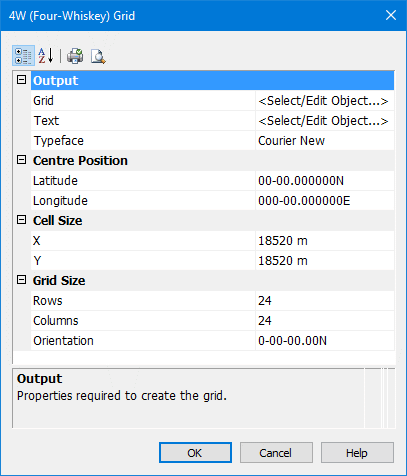
Property | Description |
|---|---|
Output | |
Grid | Select the area feature to be used as a grid. 1. Choose <Select/Edit Object> from the list. The Select Object dialog box is displayed.
2. Type a name for the grid object. 3. Select an area feature from the Object list. 4. Type values in any of the attribute fields. 5. Click OK. The Select Object dialog box is closed. The name of the area feature is displayed in the Grid field. To remove the area feature: Select Delete Grid Object from the list. The feature name is no longer displayed and the feature is deleted. |
Text | Select the text feature to be used for labels. 1. Choose <Select/Edit Object> from the list. The Select Object dialog box is displayed. 2. Type a name for the text object. 3. Select an text object feature from the Object list. 4. Type values in any of the attribute fields. 5. Click OK. The Select Object dialog box is closed. The name of the text feature is displayed in the Text field. To remove the area feature: Select Delete Text Object from the list. The feature name is no longer displayed and the feature is deleted. |
Typeface | Font used for text annotation Select a typeface from the list. |
Centre Position | |
Latitude | The latitude of the centre point of the grid. Type the values in the field. |
Longitude | The longitude of the centre point of the grid. Type the value in the field. |
Cell Size | |
X | The horizontal dimension of a grid cell. Type a value in the field. |
Y | The vertical dimension of a grid cell. Type a value in the field. |
Grid Size | |
Rows | The number of rows in a grid. Type a value in the field. |
Columns | The number of columns in a grid. Type a value in the field. |
Orientation | The angular orientation of the grid using the reference angle option for the application. Grid is initialized as north-up. Type a value in the grid |
Procedure
1. Select a Panel data layer.
2. Select the Create 4W Grid command.
The 4W (Four Whiskey) Grid dialog box is displayed.
3. Complete the grid properties (see above) and click OK
