
Create a subset of enumerated values for an attribute. This option is only available for enumerated or list attributes. If a subset is not created using this option – all values associated with the attribute are displayed.
1. Select the Permitted Values branch in the Attribute Classes data tree.
The Permitted Values tab is displayed.
2. Expand the Enumeration or List branches to select an attribute.
3. Click Edit.
The Edit Permitted Values dialog box is displayed.
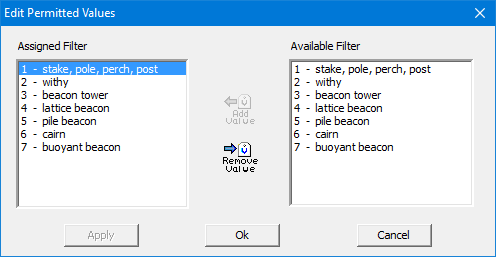
Option | Description |
|---|---|
Assigned Filter | The values that will be associated with the attribute |
Available Filter | Enumerated or numeric values that belong to the selected attribute. |
Command | Description |
|---|---|
Add Value | Associate a value with the attributes 1. Select a value in the Available Filter list. 2. Click Add Value. The value is moved to the Assigned Filter list. |
Remove Value | Remove the association with the attributes 1. Select a value in the Assigned Filter list. 2. Click Add Value. The value is moved to the Available Filter list. |
If there are no items in the Assigned Filter list, all enumerated values for the attribute will be available for use in the profile.
4. Add or remove values from the attributes.
5. Click Apply.