 CARIS HPD Paper Chart Editor
 CARIS HPD Paper Chart Editor
CARIS HPD Product Editor
CARIS HPD Source Editor
CARIS S-57 Composer
CARIS Paper Chart Composer
Menu | Edit > Points Conflate |
Snap all points within a defined distance to the selected point. Only unselected features are moved.
This can resolve minor positioning differences between features.
Set the conflation distance using Point Conflation Tolerance on the Edit Options tab of the Options dialog box.
The selected feature acts as a reference point only and is not modified. The shifted features retain their object IDs and attributes, but are assigned the position of the reference point and its spatial attributes, POSACC and QUAPOS. Feature relationships (parent/child relationships) are retained.
The results are shown in the Output window.
Related commands:
• | • |
Procedure
1. Select one or more features.
2. Select the Conflate Points command.
Example 1
A buoy and light are at different coordinate locations. If you select the buoy, the light will move to the location of the buoy.
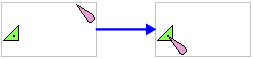
If there are multiple unselected points within the conflation tolerance, all of them will be snapped to a single selected feature.
Example 2
Two beacons are not aligned with their lights. If you select both beacons, each light will move to its nearest beacon.
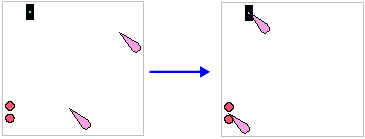
If you select multiple features and any of them fall within the conflation limit, the results may not be correct. |