CARIS HIPS and SIPS Help : Support Files Guide : Filters : Comparison Operators
 

Comparison Operators

 
Regular Expressions
Not Equal To Tags

Comparison operators check features, attributes or primitives against parameters set by the operators or against other features. Here is a list of comparison operators.

Features

<ObjectAcronymIsEqualTo/>

<ObjectAcronymIsNotEqualTo/>

Description

Find a feature that is equal/not equal to a feature acronym. For additional information on using logical operators with this tag, see Not Equal To Tags.

Attributes

Acronym="feature acronym"

MatchCase="True/False" False is default

Example

Check if AIRARE or RUNWAY features are part of collection object that is not a C_ASSO collection object.

<Filter>

  <And>

    <ObjectAcronymIsNotEqualTo Acronym="C_ASSO"/>

      <FeatureHasComponent>

        <Filter>

          <Or>

            <ObjectAcronymIsEqualTo Acronym="AIRARE"/>

            <ObjectAcronymIsEqualTo Acronym="RUNWAY"/>

          </Or>

        </Filter>

      </FeatureHasComponent>

  </And>

</Filter>

<ObjectAcronymIsLike/>

Description

Find a feature acronym that matches the given value. This operator uses regular expressions, see Regular Expressions.

Attributes

Acronym="feature acronym"

MatchCase="True/False" False is default

Example

Find all features with acronyms that begin with the characters BOY

<Filter>

  <And>

    <ObjectAcronymIsLike Acronym=”BOY.*”/>

    <AttributeValueIsUndefined Acronym="COLPAT"/>

  </And>

</Filter>

<ObjectIsAMaster/>

Description

Find a feature that is a master in a master/slave relationship.

Attributes

Example

Find all BOYCAR features that are masters.

<Filter>

  <And>

    <ObjectAcronymIsEqualTo Acronym=”BOYCAR”/>

    <ObjectIsAMaster />

  </And>

</Filter>

<ObjectIsAParent/>

Description

Find a feature that is a parent in a parent/child relationship.

Attributes

Relationship=”RelationshipCode"

Relationship is mandatory since features can be in more than one type of relationship in S-101 datasets. Relationship codes are defined in the S-101 catalogue.

The relationship code for S-57 objects is masterSlave

S-57 Example

Find all BOYCAR features that are parents.

<Filter>

  <And>

    <ObjectAcronymIsEqualTo Acronym=”BOYCAR”/>

    <ObjectIsAParent Relationship=”masterSlave” />

  </And>

</Filter>

S-100 Example

Find all BuoyCardinal features that are parents.

<Filter>

  <And>

    <ObjectAcronymIsEqualTo Acronym=”BuoyCardinal”/>

    <ObjectIsAParent Relationship=”StructureEquipment” />

  </And>

</Filter>

<ObjectIsASlave/>

Description

Find a feature that is a slave in a master/slave relationship.

Attributes

Example

Find features with a HEIGHT attribute value that are also slave objects.

<Filter>

  <And>

    <AttributeHasValue Acronym="HEIGHT"/>

    <ObjectIsASlave />

  </And>

</Filter>

<ObjectIsAChild/ >

Description

Find a feature that is a child in a parent/child relationship.

Attributes

Relationship=”RelationshipCode"

Relationship is mandatory since features can be in more than one type of relationship in S-101 datasets. Relationship codes are defined in the S-101 catalogue.

The relationship code for S-57 objects is masterSlave

S-57 Example

Find features with a HEIGHT attribute value that are also child objects.

<Filter>

  <And>

    <AttributeHasValue Acronym="HEIGHT"/>

    <ObjectIsAChild Relationship=”masterSlave” />

  </And>

</Filter>

S-100 Example

Find features with a Height attribute value that are also child objects.

<Filter>

  <And>

    <AttributeHasValue Acronym="Height"/>

    <ObjectIsAChild Relationship=”StructureEquipment” />

  </And>

</Filter>

<ObjectIsACollectionComponent/>

Description

Find features that are part of a collection

Attributes

Example

Find a feature with a value for the OBJNAM attribute that is also part of a collection object.

<Filter>

  <And>

    <AttributeHasValue Acronym="OBJNAM"/>

    <ObjectIsACollectionComponent/>

  </And>

</Filter>

<ObjectIsAMasterTo/>

Description

Find a feature that is a master to a slave object.

Attributes

Acronym="slave object acronym"

MatchCase="True/False" False is default

Example

Find BOYCAR features that are masters to light features.

<Filter>

  <And>

    <ObjectAcronymIsEqualTo Acronym=”BOYCAR”/>

    <ObjectIsAMasterTo Acronym=”LIGHTS”/>

  </And>

</Filter>

<ObjectIsAParentTo/>

Description

Find a feature that is a parent to a child object.

Attributes

Acronym="child object acronym"

Relationship=”RelationshipCode"

Relationship is mandatory since features can be in more than one type of relationship in S-101 datasets. Relationship codes are defined in the S-101 catalogue. The relationship code for S-57 objects is masterSlave

MatchCase="True/False" False is default

S-57 Example

Find BOYCAR features that are parents to light features.

<Filter>

  <And>

    <ObjectAcronymIsEqualTo Acronym=”BOYCAR”/>

    <ObjectIsParentTo Acronym=”LIGHTS” Relationship=”masterSlave" />

  </And>

</Filter>

S-100 Example

Find BuoyCardinal features that are parents to light features.

<Filter>

  <And>

    <ObjectAcronymIsEqualTo Acronym=”BuoyCardinal”/>

    <ObjectIsParentTo Acronym=”LightAllAround”/ Relationship=”StructureEquipment">

  </And>

</Filter>

<ObjectIsASlaveTo/>

Description

Find a feature that is slave to a master object.

Attributes

Acronym="master object acronym"

MatchCase="True/False" False is default

Example

Find a feature that contains a HEIGHT value and is also a slave to the buoy features listed in the filter.

<Filter>

  <And>

    <AttributeHasValue Acronym="HEIGHT"/>

    <ObjectIsASlave/>

    <Or>

      <ObjectIsASlaveTo Acronym="BOYCAR"/>

      <ObjectIsASlaveTo Acronym="BOYINB"/>

      <ObjectIsASlaveTo Acronym="BOYISD"/>

      <ObjectIsASlaveTo Acronym="BOYLAT"/>

      <ObjectIsASlaveTo Acronym="BOYSAW"/>

      <ObjectIsASlaveTo Acronym="BOYSPP"/>

    </Or>

  </And>

</Filter>

<ObjectIsAChildTo/>

Description

Find a feature that is a child to a parent object.

Attributes

Acronym="parent object acronym"

Relationship=”Relationship code"

Relationship is mandatory since features can be in more than one type of relationship in S-101 datasets. Relationship codes are defined in the S-101 catalogue. The relationship code for S-57 objects is masterSlave.

MatchCase="True/False" False is default

S-57 Example

Find a feature that contains a HEIGHT value and is also a child to the buoy features listed in the filter.

<Filter>

  <And>

    <AttributeHasValue Acronym="HEIGHT"/>

    <ObjectIsAChild Relationship=”masterSlave"/>

    <Or>

      <ObjectIsAChildTo Acronym="BOYCAR" Relationship=”masterSlave"/>

      <ObjectIsAChildTo Acronym="BOYINB" Relationship=”masterSlave"/>

      <ObjectIsAChildTo Acronym="BOYISD" Relationship=”masterSlave"/>

      <ObjectIsAChildTo Acronym="BOYLAT" Relationship=”masterSlave"/>

      <ObjectIsAChildTo Acronym="BOYSAW" Relationship=”masterSlave"/>

      <ObjectIsAChildTo Acronym="BOYSPP" Relationship=”masterSlave"/>

    </Or>

  </And>

</Filter>

S-100 Example

Find a feature that contains a Height value and is also a child to the buoy features listed in the filter.

<Filter>

  <And>

    <AttributeHasValue Acronym="Height"/>

    <ObjectIsAChild Relationship=”StructureEquipment"/>

    <Or>

      <ObjectIsAChildTo Acronym="BuoyCardinal" Relationship=”StructureEquipment"/>

      <ObjectIsAChildTo Acronym="BuoyInstallation" Relationship=”StructureEquipment"/>

      <ObjectIsAChildTo Acronym="BuoyIsolatedDanger" Relationship=”StructureEquipment"/>

      <ObjectIsAChildTo Acronym="BuoyLateral" Relationship=”StructureEquipment"/>

      <ObjectIsAChildTo Acronym="BuoySafeWater" Relationship=”StructureEquipment"/>

      <ObjectIsAChildTo Acronym="BuoySpecialPurposeGeneral" Relationship=”StructureEquipment"/>

    </Or>

  </And>

</Filter>

Attributes

<AttributeAcronymIsEqualTo/>

<AttributeAcronymIsNotEqualTo/>

Description

Find an attribute that is (or is not) assigned to the feature.

Attributes

Acronym="attribute acronym"

MatchCase="True/False" False is default

SpatialAttribute="True/False" Test a spatial attribute instead of a feature attribute. False is default.

AllSpatials="True/False" Test that all spatial attributes must match if SpatialAttribute is set to True.

Example

Find a feature that contains the SCAMIN attribute

<Filter>

  <AttributeAcronymIsEqualTo Acronym="SCAMIN"/>

</Filter

<AttributeAcronymIsLike/>

Description

Find an attribute that is assigned to a feature. This operator uses regular expressions, see Regular Expressions.

Attributes

Acronym="attribute acronym"

MatchCase="True/False" False is default

SpatialAttribute="True/False" Test a spatial attribute instead of a feature attribute. False is default.

AllSpatials="True/False" Test that all spatial attributes must match if SpatialAttribute is set to True.

Example

Find an attribute that begins with the characters SCA.

<Filter>

  <AttributeAcronymIsLike Acronym="SCA.*"/>

</Filter>

<AttributeValueIsEqualTo/>

<AttributeValueIsNotEqualTo/>

Description

Find an attribute value that is equal to or not equal to a value. For additional information on using logical operators with this tag, see Not Equal To Tags.

Attributes

Acronym="attribute acronym"

Value="value of attribute"

MatchCase="True/False" False is default

SourceFeature="True/False"

SpatialAttribute="True/False" Test a spatial attribute instead of a feature attribute. False is default.

AllSpatials="True/False" Test that all spatial attributes must match if SpatialAttribute is set to True.

Example 1

Find an M_QUAL feature with a CATZOC attribute value of 2 or 3.

<Filter>

  <And>

    <ObjectAcronymIsEqualTo Acronym="M_QUAL"/>

    <Or>

      <AttributeValueIsEqualTo Acronym="CATZOC" Value="2"/>

      <AttributeValueIsEqualTo Acronym="CATZOC" Value="3"/>

    </Or>

  </And>

</Filter>

Example 2

Find a WRECKS feature that has POSACC spatial attribute defined and is within an M_ACCY feature where M_ACCY has a POSACC spatial attribute value equal to the POSACC spatial attribute value of WRECKS.

<Filter>

  <And>

    <ObjectAcronymIsEqualTo Acronym="WRECKS "/>

    <AttributeHasValue Acronym="POSACC" SpatialAttribute="True"/>

    <GeometryIsWithin>

      <Filter>

        <And>

          <ObjectAcronymIsEqualTo Acronym="M_ACCY"/>

          <AttributeValueIsEqualTo Acronym="POSACC" SourceFeature="True" SpatialAttribute="True"/>

        </And>

      </Filter>

    </GeometryIsWithin>

  </And>

</Filter>

<AttributeValueIsLessThan/>

<AttributeValueIsGreaterThan/>

<AttributeValueIsLessThanOrEqualTo/>

<AttributeValueIsGreaterThanOrEqualTo/>

Description

Find an attribute value that is less than/greater than value.

Attributes

Acronym="attribute acronym"

Value="numeric value of attribute"

SourceFeature="True/False" Indicate if the attribute value should be retrieved from the source feature. Default is False.

MatchCase="True/False" False is default

SpatialAttribute="True/False" Test a spatial attribute instead of a feature attribute. False is default.

AllSpatials="True/False" Test that all spatial attributes must match if SpatialAttribute is set to True.

Example

Find a DEPARE area object where DRVAL2 is equal to or less than 0.

<Filter>

  <And>

    <ObjectAcronymIsEqualTo Acronym="DEPARE"/>

    <PrimitiveIsEqualTo Primitive="Area"/>

    <AttributeValueIsLessThanOrEqualTo Acronym="DRVAL2" Value="0"/>

  </And>

</Filter>

<AttributeValueIsLike/>

Description

Find an attribute value that is equal to a value. This operator uses regular expressions, see Regular Expressions

Attributes

Acronym="attribute acronym"

Value="Value"

MatchCase="True/False" False is default.

SourceFeature="True/False" Indicate if the attribute value should be retrieved from the source feature. Default is False

SpatialAttribute="True/False" Test a spatial attribute instead of a feature attribute. False is default.

AllSpatials="True/False" Test that all spatial attributes must match if SpatialAttribute is set to True.

Example

Find features where DATEND is defined and check if the value is not a number between 4 to 8 digits.

<Filter>

  <And>

    <AttributeHasValue Acronym="DATEND"/>

    <Not>

      <AttributeValueIsLike Acronym="DATEND" Value="[0-9]{4,8}"/>

    </Not>

  </And>

</Filter>

<AttributeValueIsUndefined/>

<AttributeValueIsUnknown/>

Description

Find a feature attribute value that is undefined or unknown.

Attributes

Acronym="attribute acronym"

SpatialAttribute="True/False" Test a spatial attribute instead of a feature attribute. False is default.

AllSpatials="True/False" Test that all spatial attributes must match if SpatialAttribute is set to True.

Example

Find features that have a NATION attribute that is undefined or unknown.

<Filter>

  <Or>

    <AttributeValueIsUndefined Acronym="NATION"/>

    <AttributeValueIsUnknown Acronym="NATION"/>

  </Or>

</Filter>

<AttributeValueIsDefined>

Description

Find features that have an attribute with a value, including unknown.

Attributes

Acronym="attribute acronym"

SpatialAttribute="True/False" Test a spatial attribute instead of a feature attribute. False is default.

AllSpatials="True/False" Test that all spatial attributes must match if SpatialAttribute is set to True.

Example

Find features with a value for the MARSYS attribute.

<Filter>

<AttributeValueIsDefined Acronym="MARSYS"/>

</Filter>

<AttributeValueIsBetween/>

Description

Find an attribute value that is between a minimum and maximum range

Attributes

Acronym="attribute acronym"

Min="minimum value"

Max="maximum value"

SpatialAttribute="True/False" Test a spatial attribute instead of a feature attribute. False is default.

AllSpatials="True/False" Test that all spatial attributes must match if SpatialAttribute is set to True.

Example

Find area, line, or point features with a MAC attribute set to 54 and TIM attributes between 0 and 999.

<Filter>

  <And>

    <Or>

      <PrimitiveIsEqualTo Primitive="Area"/>

      <PrimitiveIsEqualTo Primitive="Line"/>

      <PrimitiveIsEqualTo Primitive="Point"/>

    </Or>

    <AttributeValueIsEqualTo Acronym="MAC" Value="54"/>

    <And>

      <AttributeValueIsBetween Acronym="TIM" Min="0" Max="999"/>

    </And>

  </And>

</Filter>

<AttributeValueContains/>

Description

Find an attribute value that includes the character, text or numeric value being searched.

If the attribute type is alphanumeric or string, the filter locates the string value or characters.

If the attribute type is text, the filter opens the text file that is stored in the attribute to find the string in the text.

If the attribute type is list, the filter searches for the numeric value in the list (for example, COLOUR="3,4").

Attributes

Acronym="attribute acronym”

Value="attribute value"

Acronym2="attribute acronym" This can be used in place of the Value attribute.

BeginsWith="True/False" String begins with value. False is default

EndsWith="True/False" String ends with value. False is default

SourceFeature="True/False" Indicate if the attribute value should be retrieved from the source feature. Default is False.

SpatialAttribute="True/False" Test a spatial attribute instead of a feature attribute. False is default.

AllSpatials="True/False" Test that all spatial attributes must match if SpatialAttribute is set to True.

Example 1

Find any INFORM attribute value that contains leading or trailing spaces.

<Filter>

  <And>

    <AttributeHasValue Acronym="INFORM"/>

    <Or>

      <AttributeValueContains Acronym="INFORM" Value=" " BeginsWith="True"/>

      <AttributeValueContains Acronym="INFORM" Value=" " EndsWith="True"/>

    </Or>

  </And>

</Filter>

Example 2

Find a feature where the INFORM or TXTDSC attributes do not begin with the attribute value contained in CLSNAM.

<Filter>

  <Not>

     <Or>

        <AttributeValueContains Acronym="INFORM" Acronym2="CLSNAM"          BeginsWith="True"/>

        <AttributeValueContains Acronym="TXTDSC" Acronym2="CLSNAM"

         BeginsWith="True"/>

     </Or>

  </Not>

</Filter>

<AttributeHasValue/>

Description

Find an attribute that has a value. The value can be of any type (text, integer, etc), except unknown.

Attributes

Acronym="attribute acronym”

SpatialAttribute="True/False" Test a spatial attribute instead of a feature attribute. False is default.

AllSpatials="True/False" Test that all spatial attributes must match if SpatialAttribute is set to True.

Example

Find PICREP or PUBREF attributes that do not contain a value.

<Filter>

  <Not>

     <Or>

       <AttributeHasValue Acronym="PICREP"/>

       <AttributeHasValue Acronym="PUBREF"/>

     </Or>

  </Not>

</Filter>

<AllAttributesEqualToSourceFeature/>

Description

Find a feature where all its attribute values are the same as the source feature. The source feature is the one being tested and passing through the filter. This filter is only applicable when it is inside a geometry filter.

Attributes

Example

Find a BERTHS feature that shares a spatial with another BERTHS feature and has identical attributes.

<Filter>

  <And>

    <ObjectAcronymIsEqualTo Acronym="BERTHS"/>

    <GeometrySharesSpatial>

      <Filter>

        <And>

          <ObjectAcronymIsEqualTo Acronym="BERTHS"/>

          <AllAttributesEqualToSourceFeature/>

        </And>

      </Filter>

    </GeometrySharesSpatial>

  </And>

</Filter>

<AttributeValueEqualsDirectionOfDigitization/>

Description

Find the attribute value that is equal to the direction of digitization (angle). This operator is only be used for straight lines.

Attributes

Acronym="attribute acronym"

Tolerance="degree value"

Reverse="True/False" Boolean flag to indicate if matching should be done on the reverse direction of digitization.

Example

Find a NAVLNE feature that has a value for ORIENT where the line bearing (direction of digitization) is within 5 degrees of the ORIENT value.

<Filter>

  <And>

    <ObjectAcronymIsEqualTo Acronym="NAVLNE"/>

    <AttributeHasValue Acronym="ORIENT"/>

    <Not>

      <Or>

        <AttributeValueEqualsDirectionOfDigitization Acronym="ORIENT" Tolerance="5"/>

        <AttributeValueEqualsDirectionOfDigitization Acronym="ORIENT" Tolerance="5" Reverse="True"/>

      </Or>

    </Not>

  </And>

</Filter>

<CompareAttributeValues/>

Description

Compare two attribute values using an operator.

Attributes

Acronym1="attribute acronym" First attribute to compare.

Acronym2= "attribute acronym" Second attribute to compare.

Operator= "=" "!=" (not equal), "&#x3C;" (less than), "&#x3C;=" (less than or equals to), ">", ">="

SourceFeature1="True/False" Indicate if the first attribute value should be retrieved from the source feature. This tag is only applicable inside of a geometry filter. Default is False.

SourceFeature2="True/False" Indicate if the second attribute value should be retrieved from the source feature. This tag is only applicable inside of a Geometry filter. Default is False.

SpatialAttribute1="True/False" Indicate if the attributes are spatial attributes. Default is False.

SpatialAttribute2="True/False" Indicate if the attributes are spatial attributes. Default is False.

Example 1

Find a feature where DRVAL1 and DRVAL2 are both defined and where DRVAL1 is larger than DRVAL2.

<Filter>

  <And>

    <AttributeHasValue Acronym="DRVAL1"/>

    <AttributeHasValue Acronym="DRVAL2"/>

    <CompareAttributeValues Acronym1="DRVAL1" Acronym2="DRVAL2" Operator=">"/>

  </And>

</Filter>

Example 2

Find a feature with VALSOU defined within a DEPARE area, where the VALSOU of the source feature is less than the DRVAL1 of the DEPARE feature.

<Filter>

  <And>

    <AttributeHasValue Acronym="VALSOU"/>

    <GeometryIsWithin>

      <Filter>

        <And>

          <PrimitiveIsEqualTo Primitive="Area"/>

          <ObjectAcronymIsEqualTo Acronym="DEPARE"/>

          <CompareAttributeValues Acronym1="VALSOU" Acronym2="DRVAL1"

           SourceFeature1="True" Operator="&#x3C;="/>

        </And>

      </Filter>

    </GeometryIsWithin>

  </And>

</Filter>

<AttributeValuesWithin/>

Description

Find list values that are within a given set.

Attributes

Acronym="attribute acronym" list attribute to evaluate.

Values = "list values" allowable list values.

Example 1

Find any list value that include 1, 3, 5 (e.g. 1,5,3,3 or 3, 5)

<Filter>

<AttributeValuesWithin Acronym="COLOUR" Values="1,3,5"/>

</Filter>

Example 2

Find any list value other than 1, 3, 5 (e.g. 2 or 1, 2 or 1, 4, 5)

<Filter>

<Not>

<AttributeValuesWithin Acronym="COLOUR" Values="1,3,5"/>

</Not>

</Filter>

Primitives

<PrimitiveIsEqualTo/>

<PrimitiveIsNotEqualTo/>

Description

Find if the geometric primitive matches.

Attributes

Primitive="geometric primitve"

S-57: Point, Line, Area, Sounding, Text, Image

CARIS: Polygon, Symbol, Name, Sounding, SpotHeight, Line and Point

DGN: Point, Line, Area, Symbol

Example 1

Find area features that contain unknown or undefined values for the dirimp attribute.

<Filter>

  <And>

    <PrimitiveIsEqualTo Primitive="Area"/>

    <Or>

      <AttributeValueIsUndefined Acronym="dirimp"/>

      <AttributeValueIsUnknown Acronym="dirimp"/>

    </Or>

  </And>

</Filter>

Example 2

Map an IC32 mangrove symbol to a VEGATN point feature with CATVEG value of 21.

<Object FeatureCode="IC32" Description="Mangrove">

  <Filter>

    <PrimitiveIsEqualTo Primitive="Symbol"/>

  </Filter>

  <MapObject>

    <MapObjectAcronym Acronym="VEGATN"/>

    <SetAttributeValue Acronym="CATVEG" Value="21"/>

  </MapObject>

</Object>

<PrimitiveHasZValue/>

Description

Find if primitive has a Z component

Attributes

Example

Find any feature with a Z value.

<Filter>

  <PrimitiveHasZValue/>

</Filter>

<TextValueIsEqualTo/>

<TextValueIsLessThan/>

<TextValueIsLessThanOrEqualTo/>

<TextValueIsGreaterThan/>

<TextValueIsGreaterThanOrEqualTo/>

Description

Find if the text value is equal/less than/greater than the given value.

Attributes

Value = "value to compare against text value."

Acronym = "attribute acronym to compare against the text value."

(Value or Acronym must be specified)

MatchCase = "True/False". Boolean flag indicating if the case should match. Default is True.

Numeric = "True/False". Boolean flag indicating if a numeric comparison between the text and the value is to be done. This tag is only applicable when used with the Value tag.

Example 1

Find all text features where text is not equal to the feature’s NAM attribute.

<Filter>

  <And>

    <PrimitiveIsEqualTo Primitive="Text"/>

      <Not>

        <TextValueIsEqualTo Acronym="NAM"/>

    </Not>

  </And>

</Filter>

Example 2

Find a text feature and convert its content to a number before comparing to the value specified. If the text contains 2.3 or 2.30, the values will match as they are compared as numbers, and not as literal text.

<Filter>

  <And>

    <PrimitiveIsEqualTo Primitive="Text"/>

    <TextValueIsEqualTo Value="2.3" Numeric="True"/>

  </And>

</Filter>

Depth

<ZValueIsLessThan/>

<ZValueIsLessThanOrEqualTo/>

<ZValueIsGreaterThanOrEqualTo/>

<ZValueIsGreaterThan/>

<ZValueIsEqualTo/>

<ZValueIsNotEqualTo/>

Description

Find a depth or height value that is equal/greater than/less than an attribute value or Z value.

Attributes

Acronym="attribute acronym"

Value="numeric value"

SourceFeatureAcronym="True/False" If true, compare an attribute value of a source feature against a Z value. Default is false.

SourceFeatureZValue="True/False". If true, compare a source feature’s Z value against a feature’s Z value. Default is false. This attribute can only be used inside a geometry filter.

NegateAttribute="True/False" If true, an attribute value is multiplied by -1; if False, the original value is retained. False is default.

Example 1

Find any SOUNDG feature that is within a DEPARE where the Z value of the sounding is less than or equal to the DRVAL1 of the DEPARE.

<Filter>

  <And>

    <ObjectAcronymIsEqualTo Acronym="SOUNDG"/>

    <GeometryIsWithin>

      <Filter>

        <And>

          <ObjectAcronymIsEqualTo Acronym="DEPARE"/>

          <AttributeHasValue Acronym="DRVAL1"/>

          <ZValueIsLessThanOrEqualTo Acronym="DRVAL1" SourceFeatureZValue="True"/>

        </And>

      </Filter>

    </GeometryIsWithin>

  </And>

</Filter>

Example 2

Find any UWTROC feature with VALSOU that is at the same location as a SOUNDG feature where the sounding Z value is equal to the VALSOU of the UWTROC.

<Filter>

  <And>

    <ObjectAcronymIsEqualTo Acronym="UWTROC"/>

    <AttributeHasValue Acronym="VALSOU"/>

    <GeometryEquals>

      <Filter>

        <And>

          <ObjectAcronymIsEqualTo Acronym="SOUNDG"/>

          <ZValueIsEqualTo SourceFeatureAcronym="VALSOU"

        </And>

      </Filter>

    </GeometryEquals>

  </And>

</Filter>

Example 3

Find a sounding where the HDH attribute is defined and is not equal to the depth of the sounding. These are negative sounding values to be compared with positive HDH values, therefore the Z values are multiplied by -1 before comparing them to the HDH attribute value.

<Filter>

  <And>

    <PrimitiveIsEqualTo Primitive="Sounding"/>

    <And>

      <AttributeHasValue Acronym="HDH"/>

      <ZValueIsNotEqualTo Acronym="HDH" NegateAttribute="True"/>

    </And>

  </And>

</Filter>

Geometry

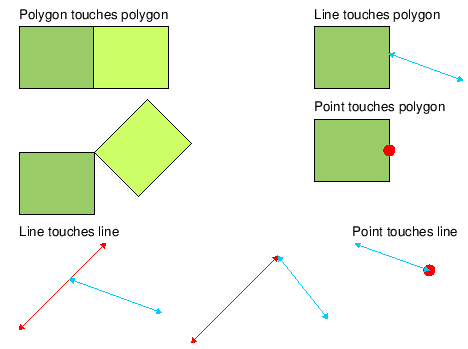
<GeometryTouches>

Description

Find a feature’s geometry that touches, but does not overlap, the geometry of another feature.

Example

Find an feature with geometry that touches DEPARE area feature with a DRVAL2 attribute that is less than or equal to 0.

<GeometryTouches>

  <Filter>

    <And>

      <ObjectAcronymIsEqualTo Acronym="DEPARE"/>

      <PrimitiveIsEqualTo Primitive="Area"/>

      <AttributeValueIsLessThanOrEqualTo Acronym="DRVAL2" Value="0"/>

    </And>

  </Filter>

</GeometryTouches>

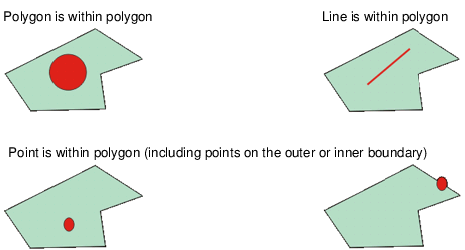
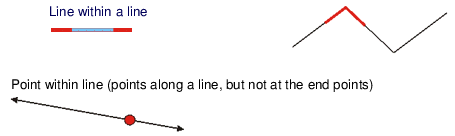
<GeometryIsWithin>

Description

Find if a feature’s geometry is completely contained within the geometry of a another feature.

Example

Find features within a LNDARE area or line.

<GeometryIsWithin>

  <Filter>

    <And>

      <ObjectAcronymIsEqualTo Acronym="LNDARE"/>

        <Or>

          <PrimitiveIsEqualTo Primitive="Area"/>

          <PrimitiveIsEqualTo Primitive="Line"/>

      </Or>

    </And>

  </Filter>

</GeometryIsWithin>

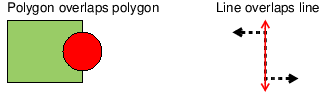
<GeometryOverlaps>

Description

Find if a feature overlaps another feature.

.

Example

Check for a case where a feature overlaps a LNDARE area feature.

<GeometryOverlaps>

  <Filter>

    <And>

      <ObjectAcronymIsEqualTo Acronym="LNDARE"/>

      <PrimitiveIsEqualTo Primitive="Area"/>

    </And>

  </Filter>

</GeometryOverlaps>

<GeometryContains>

Description

Find a feature’s geometry that contains the geometry of another feature. For example, if feature B is within feature A – then feature A contains feature B. This filter is the inverse of GeometryIsWithin.

Example

Find a feature that contains DEPARE, DRGARE, or UNSARE area features.

<GeometryContains>

  <Filter>

    <And>

      <PrimitiveIsEqualTo Primitive="Area"/>

        <Or>

          <ObjectAcronymIsEqualTo Acronym="DEPARE"/>

          <ObjectAcronymIsEqualTo Acronym="DRGARE"/>

          <ObjectAcronymIsEqualTo Acronym="UNSARE"/>

        </Or>

    </And>

  </Filter>

</GeometryContains>

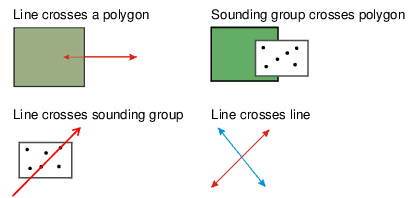
<GeometryCrosses>

Description

Find if a feature crosses another feature.

Example

Find features that cross DEPCNT features.

<Filter>

  <GeometryCrosses>

    <Filter>

      <ObjectAcronymIsEqualTo Acronym="DEPCNT"/>

    </Filter>

  </GeometryCrosses>

</Filter>

<GeometryEquals>

Description

Find if the geometry of two features are identical. For example, feature A is identical to feature B.

Example

Find features that share the same geometry as a SEAARE feature.

<Filter>

  <GeometryEquals>

    <Filter>

      <ObjectAcronymIsEqualTo Acronym="SEAARE"/>

    </Filter>

  </GeometryEquals>

</Filter>

<GeometryIsDisjoint>

Description

Evaluate if the first feature is in a different location than the second feature. Features do not touch each other.

Example

Find DEPCNT features that do not touch DEPARE features.

<Filter>

  <ObjectAcronymIsEqualTo Acronym="DEPCNT"/>

  <GeometryIsDisjoint>

    <Filter>

      <ObjectAcronymIsEqualTo Acronym="DEPARE"/>

    </Filter>

  </GeometryIsDisjoint>

</Filter>

<GeometryIntersects>

Description

Find features with geometry that intersects another feature. This operator is the opposite of GeometryIsDisjoint.

Example

Find LNDARE features that intersect with another feature.

<GeometryIntersects>

  <Filter>

    <ObjectAcronymIsEqualTo Acronym="LNDARE"/>

  </Filter>

</GeometryIntersects>

<GeometryIsCoveredBy>

Description

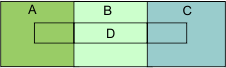
Find if an area feature is covered by one or more area features listed in the filter. The area cannot be covered by a single area but can extend over more than one area feature.

Polygon D is covered by polygons A, B, and C

Example

Find area features that are covered by LNDARE,BRIDGE,FLODOC,OFSPLF, or PONTON area features.

<GeometryIsCoveredBy>

  <Filter>

    <And>

      <PrimitiveIsEqualTo Primitive="Area"/>

        <Or>

          <ObjectAcronymIsEqualTo Acronym="LNDARE"/>

          <ObjectAcronymIsEqualTo Acronym="BRIDGE"/>

          <ObjectAcronymIsEqualTo Acronym="FLODOC"/>

          <ObjectAcronymIsEqualTo Acronym="OFSPLF"/>

          <ObjectAcronymIsEqualTo Acronym="PONTON"/>

        </Or>

    </And>

  </Filter>

</GeometryIsCoveredBy>

<GeometryCovers>

Description

Find if a feature covers one or more features listed in the filter. These can be:

Area features that cover area, line, point or sounding features.

Line features that cover line, point or sounding features.

Point/sounding features that cover (are equal to) point/sounding features.

Example

Find an area feature that covers WATTUR or SOUNDG areas.

<Filter>

  <GeometryCovers>

    <Filter>

      <Or>

        <ObjectAcronymIsEqualTo Acronym="WATTUR"/>

        <ObjectAcronymIsEqualTo Acronym="SOUNDG"/>

      </Or>

    </Filter>

  </GeometryCovers>

</Filter>

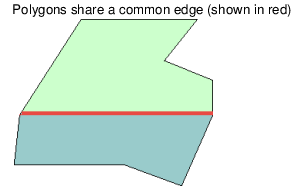
<GeometrySharesSpatial>

Description

Find if the feature shares at least one spatial feature with another feature. The operator inspects all representations that are sharing the spatial to see if the representation is used by the other feature being processed.

The GeometrySharesSpatial test is the only geometry test to support multiple filters. All filter must pass in order for the spatial test to pass.

Attributes

AllSpatials = True then all of spatials must be shared. If False, then at least one spatial is shared by another feature. False is default.

SpatialNotSharedWith: Can be used inside the GeometrySharesSpatial parameter and it must include a filter to test whether the spatial feature is not shared with a feature that passes the selected filter.

ReportSharedSpatials = True then shared spatials will be reported with Zoom/Highlight links.

ReportSharedSpatials = False then shared spatials are not reported. False is the default.

ReportUnsharedSpatials = True then unshared spatials will be reported with Zoom/Highlight links.

ReportUnsharedSpatials = False then unshared spatials are not reported. False is the default.

SameDirection = True then the shared edge is in the same direction as the feature being tested. If False, the direction of the edge is not taken into account, i.e., the direction is irrelevant. False is default.

OppositeDirection = True then the shared edge is in the opposite direction as the feature being tested. If False, the direction of the edge is not taken into account, i.e.,the direction is irrelevant. False is default.

The SameDirection and OppositeDirection attributes work together.

SameDirection=True and OppositeDirection=True: the edge must be shared in both the same and opposite direction.

SameDirection=True and OppositeDirection=False: the edge must be shared in the same direction.

OppositeDirection=True and SameDirection=False: the edge must be shared in the opposite direction.

If SameDirection=False and OppositeDirection=False: direction is not taken into account.

Example 1

Find features that share all edges with a LNDARE area feature.

<GeometrySharesSpatial AllSpatials="True">

  <Filter>

    <And>

      <ObjectAcronymIsEqualTo Acronym="LNDARE"/>

      <PrimitiveIsEqualTo Primitive="Area"/>

    </And>

  </Filter>

</GeometrySharesSpatial>

Example 2

Find features that features share edges in the same direction as an LNDARE area feature.

<GeometrySharesSpatial SameDirection="True">

  <Filter>

    <And>

      <PrimitiveIsEqualTo Primitive="Area"/>

      <ObjectAcronymIsEqualTo Acronym="LNDARE"/>

    </And>

  </Filter>

</GeometrySharesSpatial>

Example 3

Find an area feature that shares a spatial with a COALNE or SLCONS line but is NOT shared with a LNDARE area.

<Filter>

  <And>

    <PrimitiveIsEqualTo Primitive="Area"/>

    <GeometrySharesSpatial>

      <Filter>

        <And>

          <Or>

            <ObjectAcronymIsEqualTo Acronym="COALNE"/>

            <ObjectAcronymIsEqualTo Acronym="SLCONS"/>

          </Or>

          <PrimitiveIsEqualTo Primitive="Line"/>

        </And>

        <SpatialNotSharedWith>

          <Filter>

            <And>

              <ObjectAcronymIsEqualTo Acronym="LNDARE"/>

              <PrimitiveIsEqualTo Primitive="Area"/>

            </And>

          </Filter>

        </SpatialNotSharedWith>

      </Filter>

    </GeometrySharesSpatial>

  </And>

</Filter>

<GeometryIsAStraightLine>

Description

Test if all vertices on a line are straight. This test is applied only to line features. This is not a filter tag; it is tested within a filter and does not contain a filter like other geometry tests.

A tolerance can be also applied to this test. The tolerance is the allowed distance between a completely straight line and a section of line with a deviation but might still be considered straight. A default tolerance of 0.01 metres is available, but tolerance values can be changed.

In the above example, A and B represent the distance that an intermediate vertex is offset from the end points of the line. If this distance is greater than the specified tolerance value, a warning message is reported.

Attributes

tolerance = "tolerance value in metres"

Example

Find a feature with a CATTRK attribute value of 1 with geometry that is NOT a straight line and where the divergence exceeds the specified tolerance value.

<Filter>

  <And>

    <AttributeValueIsEqualTo Acronym="CATTRK" Value="1"/>

    <Not>

      <GeometryIsAStraightLine Tolerance="0.01"/>

    </Not>

  </And>

</Filter>

<PointsWithinTolerance/>

Description

Find if a master feature is located within a certain distance or tolerance of other slave features. This operator requires additional filters and it only works for point features. Points that share geometry with the feature being tested will be skipped.

Attributes

Example

Find a point feature that is located near a LIGHTS or TOPMAR point feature, but is not sharing the same geometry.

<Filter>

  <And>

    <PrimitiveIsEqualTo Primitive="Point" />

    <PointsWithinTolerance>

      <Filter>

        <And>

          <PrimitiveIsEqualTo Primitive="Point" />

            <Or>

              <ObjectAcronymIsEqualTo Acronym="LIGHTS" />

              <ObjectAcronymIsEqualTo Acronym="TOPMAR" />

            </Or>

          </And>

        </Filter>

    </PointsWithinTolerance>

  </And>

</Filter>

Feature Relations

<FeatureHasComponent>

Description

Find if a collection feature contains features that meet the criteria set in the filter. This operator requires additional filters.

Attributes

Example

Find C_ASSO collection features that include T_TIMS and T_HMON features

<Filter>

  <And>

    <ObjectAcronymIsEqualTo Acronym="C_ASSO"/>

    <FeatureHasComponent>

      <Filter>

        <Or>

          <ObjectAcronymIsEqualTo Acronym="T_TIMS"/>

          <ObjectAcronymIsEqualTo Acronym="T_HMON"/>

        </Or>

      </Filter>

    </FeatureHasComponent>

  </And>

</Filter>

<FeatureHasMaster>

Description

Find if a feature is a slave of a master feature that meet the criteria set in the filter. This operator requires additional filters.

Attributes

Example

Find features that have a slave relationship to another that is not part of a C_ASSO collection object.

<Filter>

  <FeatureHasMaster>

    <Filter>

      <Not>

        <FeatureIsAComponentOf>

          <Filter>

            <ObjectAcronymIsEqualTo Acronym="C_ASSO" />

          </Filter>

        </FeatureIsAComponentOf>

      </Not>

    </Filter>

  </FeatureHasMaster>

</Filter>

<FeatureHasParent>

Description

Find if a feature is a child of a parent feature that meet the criteria set in the filter. This operator requires additional filters.

Attributes

Relationship=”RelationshipCode"

Relationship is mandatory since features can be in more than one type of relationship in S-101 datasets. Relationship codes are defined in the S-101 catalogue.

The relationship code for S-57 objects is masterSlave.

S-57 Example

Find features that have a child relationship to another that is not part of a C_ASSO collection object.

<Filter>

  <FeatureHasParent Relationship=”masterSlave”>

    <Filter>

      <Not>

        <FeatureIsAComponentOf>

          <Filter>

            <ObjectAcronymIsEqualTo Acronym="C_ASSO" />

          </Filter>

        </FeatureIsAComponentOf>

      </Not>

    </Filter>

  </FeatureHasParent>

</Filter>

S-100 Example

Find features that have a child relationship to another that is not part of a RangeSystem collection object.

<Filter>

  <FeatureHasParent Relationship=”StructureEquipment”>

    <Filter>

      <Not>

        <FeatureIsAComponentOf>

          <Filter>

            <ObjectAcronymIsEqualTo Acronym="RangeSystem" />

          </Filter>

        </FeatureIsAComponentOf>

      </Not>

    </Filter>

  </FeatureHasParent>

</Filter>

<FeatureHasSlave/>

Description

Find if a master feature contains slaves that meet the criteria set in the filter. This operator requires additional filters.

Attributes

Example

Find a master object where DATEND, DATSTA, PEREND, or PERSTA attributes are not equal to the corresponding attribute on its slave.

<Filter>

  <FeatureHasSlave>

    <Filter>

      <Or>

        <AttributeValueIsNotEqualTo Acronym="DATEND" SourceFeature="True"/>

        <AttributeValueIsNotEqualTo Acronym="DATSTA" SourceFeature="True"/>

        <AttributeValueIsNotEqualTo Acronym="PEREND" SourceFeature="True"/>

        <AttributeValueIsNotEqualTo Acronym="PERSTA" SourceFeature="True"/>

      </Or>

    </Filter>

  </FeatureHasSlave>

</Filter>

<FeatureHasChild/>

Description

Find if a parent feature contains children that meet the criteria set in the filter. This operator requires additional filters.

Attributes

Relationship=”RelationshipCode”

Relationship is mandatory since features can be in more than one type of relationship in S‑101 datasets. Relationship codes are defined in the S-101 catalogue. The relationship code for S-57 objects is masterSlave

S-57 Example

Find a parent object where DATEND, DATSTA, PEREND, or PERSTA attributes are not equal to the corresponding attribute on its child.

<Filter>

  <FeatureHasChild Relationship=”masterSlave”>

    <Filter>

      <Or>

        <AttributeValueIsNotEqualTo Acronym="DATEND" SourceFeature="True"/>

        <AttributeValueIsNotEqualTo Acronym="DATSTA" SourceFeature="True"/>

        <AttributeValueIsNotEqualTo Acronym="PEREND" SourceFeature="True"/>

        <AttributeValueIsNotEqualTo Acronym="PERSTA" SourceFeature="True"/>

      </Or>

    </Filter>

  </FeatureHaschild>

</Filter>

S-100 Example

Find a parent object where dateEnd, dateEnd, periodicDateEnd, or periodicDateStart attributes are not equal to the corresponding attribute on its child.

<Filter>

  <FeatureHasChild Relationship=”StructureEquipment”>

    <Filter>

      <Or>

        <AttributeValueIsNotEqualTo Acronym="dateEnd" SourceFeature="True"/>

        <AttributeValueIsNotEqualTo Acronym="dateEnd" SourceFeature="True"/>

        <AttributeValueIsNotEqualTo Acronym="periodicDateEnd" SourceFeature="True"/>

        <AttributeValueIsNotEqualTo Acronym="periodicDateStart" SourceFeature="True"/>

      </Or>

    </Filter>

  </FeatureHaschild>

</Filter>

<FeatureIsAComponentOf>

Description

Find if a feature is a part of a collection object that passes the filter. This operator requires additional filters

Attributes

Example

Find a slave feature that is not a component of a C_ASSO collection object.

<Filter>

  <FeatureHasMaster>

    <Filter>

      <Not>

        <FeatureIsAComponentOf>

          <Filter>

            <ObjectAcronymIsEqualTo Acronym="C_ASSO" />

          </Filter>

        </FeatureIsAComponentOf>

      </Not>

    </Filter>

  </FeatureHasMaster>

</Filter>

S-57 Product Metadata Subfields

<AttributeValueContains/>

Definition

Find if an attribute value is the same as a product metadata subfield content.

Attributes

Acronym="attribute acronym"

MetaDataKey="subfield" (product subfields: HDAT, VDAT, SDAT, CSCL, DUNI, HUNI, PUNI)

Example

Find features with an INFORM attribute that contains the value from the CSCL product metadata subfield.

<Filter>

  <And>

    <DataSourceHasAttribute Acronym="CSCL"/>

    <AttributeHasValue Acronym="INFORM"/>

    <AttributeValueContains Acronym="INFORM" MetaDataKey="CSCL"/>

  </And>

</Filter>

<AttributeValueIsEqualTo/>

<AttributeValueIsNotEqualTo/>

Definition

Find if an attribute value is equal/not equal to a product metadata subfield value.

Attributes

Acronym="attribute acronym"

MetaDataKey="subfield" (product subfields: HDAT, VDAT, SDAT, CSCL, DUNI, HUNI, PUNI)

Example 1

Find features with the VERDAT attribute defined where its value is equal to that in the Vertical Datum (VDAT) product metadata subfield.

<Filter>

  <And>

    <DataSourceHasAttribute Acronym="VDAT"/>

    <AttributeHasValue Acronym="VERDAT"/>

    <AttributeValueIsEqualTo Acronym="VERDAT" MetaDataKey="VDAT"/>

  </And>

</Filter>

<AttributeValueIsGreaterThan/>

<AttributeValueIsGreaterThanOrEqualTo/>

<AttributeValueIsLessThan/>

<AttributeValueIsLessThanOrEqualTo/>

Definition

Find if an attribute value is greater than/less than or equal to a product metadata subfield value.

Attributes

Acronym="attribute acronym"

MetaDataKey="Subfield" (product subfields: HDAT, VDAT, SDAT, CSCL, DUNI, HUNI, PUNI)

Example

Find a SCAMIN value that is set to a smaller value (larger scale) than the compilation scale in the product subfield CSCL.

<Filter>

  <And>

    <DataSourceHasAttribute Acronym="CSCL"/>

    <AttributeHasValue Acronym="SCAMIN"/>

    <AttributeValueIsLessThan Acronym="SCAMIN" MetaDataKey="CSCL"/>

  </And>

</Filter>

<AttributeValueIsLike/>

Description

Find an attribute value that is equal to a value. This operator uses regular expressions, see Regular Expressions

Attributes

Value="Value"

MetaDataKey="Subfield" (product subfields: HDAT, VDAT, SDAT, CSCL, DUNI, HUNI, PUNI)

Example

Find if the issue date (ISDT) was in 2015.

<Filter>

  <AttributeValueIsLike MetaDataKey="ISDT" Value="2015.*" />

</Filter>

<DataSourceHasAttribute/>

Description

Find if the product has a value for the metadata subfield specified.

Attributes

Acronym = "product metadata subfield"

Example

Find if the product has the HUNI subfield defined and compare if the HUNITS attribute value in a feature is equal to the HUNI subfield in the product.

<Filter>

  <And>

    <DataSourceHasAttribute Acronym="HUNI"/>

    <AttributeHasValue Acronym="HUNITS"/>

    <AttributeValueIsEqualTo Acronym="HUNITS" MetaDataKey="HUNI"/>

  </And>

</Filter>

CARIS Features

<ThemeNumberIsEqualTo/>

<ThemeNumberIsNotEqualTo/>

Description

Find if the feature is on a theme number that is equal/not equal to theme number value.

Attributes

ThemeNumber="value"

Example

Find a theme number that equals 100

<Filter>

  <ThemeNumberIsEqualTo ThemeNumber="100"/>

</Filter>

<SpotHeightHasSymbol/>

Description

Find a spot height that contains a symbol

Attributes

Example

Find a spot height with a symbol

<Filter>

  <And>

    <PrimitiveIsEqualTo Primitive="SpotHeight"/>

    <SpotHeightHasSymbol/>

  </And>

</Filter>

<CARISKeywordIsEqualTo/>

Description

Find if the translated keyword value is equal to the given value.

Attributes

Keyword=key word

Value = value the value to test against the translated keyword

Example

Find a feature where the feature compilation status is equal to 1.

<Filter>

  <CARISKeywordIsEqualTo Keyword="CARIS_COMPILATION_STATUS" Value="1"/>

</Filter>

<CaseNumberIsEqualTo/>

Description

Find if the feature has a case number that is equal to the given value.

Attributes

Value = "value to compare against the case number"

Example

Find line features with case number equal to 15.

<Filter>

  <And>

    <PrimitiveIsEqualTo Primitive="Line"/>

    <CaseNumberIsEqualTo Value="15"/>

  </And>

</Filter>

<IsDisplayLabel/>

Description

Find if the feature is a display label.

Attributes

Example

Find features of primitive type Name that are display labels.

<Filter>

  <And>

    <PrimitiveIsEqualTo Primitive="Name"/>

    <IsDisplayLabel/>

  </And>

</Filter>

DGN Features

<DGNCellNameIsEqualTo/>

<DGNCellNameIsNotEqualTo/>

Description

Find if a DGN cell is equal/not equal to value.

Attributes

Value="DGN cell"

Example

Find DGN cell 4004.

<Filter>

  <And>

    <PrimitiveIsEqualTo Primitive="Symbol"/>

    <DGNCellNameIsEqualTo Value="4004"/>

  </And>

</Filter>

<DGNColourNumberIsEqualTo/>

<DGNColourNumberIsNotEqualTo/>

Description

Find if DGN colour number is equal/not equal to value.

Attributes

Value= "DGN colour number"

Example

Find DGN lines with colour number 7

<Filter>

  <And>

    <PrimitiveIsEqualTo Primitive="Line"/>

    <DGNColourNumberIsEqualTo Value="7" />

  </And>

</Filter>

<DGNLineStyleIsEqualTo/>

<DGNLineStyleIsNotEqualTo/>

Description

Find if a DGN line style is equal/not equal to value.

Attributes

Value= "DGN line style number"

Example

Find DGN line style 1

<Filter>

  <And>

    <PrimitiveIsEqualTo Primitive="Line"/>

    <DGNLineStyleIsEqualTo Value="1" />

  </And>

</Filter>

<DGNLineWeightIsEqualTo/>

<DGNLineWeightIsNotEqualTo/>

Description

Find if DGN line weight is value.

Attributes

Value= "DGN line weight number"

Example

Find DGN line weight 2

<Filter>

  <And>

    <PrimitiveIsEqualTo Primitive="Line"/>

    <DGNLineWeightIsEqualTo Value="2" />

  </And>

</Filter>