CARIS HPD Paper Chart Editor
 CARIS HPD Paper Chart Editor
This command is only available if the Raster Chart Module is enabled. |
Menu | Raster > Create Empty Raster Layers |
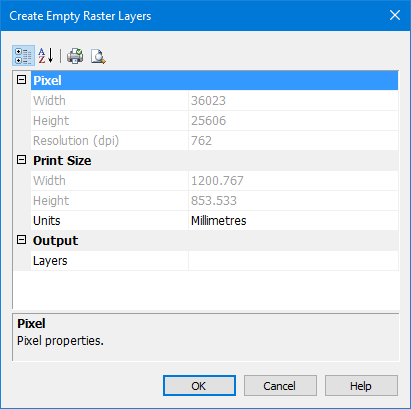
Pop-up | Create Empty Raster Layers (Layers window) |
Add empty raster layers to a sheet.
This command is useful for the following operations:
• Create a raster version of vector chart by adding empty raster layers and then burning vector features to the layers.
• Add additional information that requires another colour. For example, a traffic separation area that requires a partly transparent magenta layer.
Related commands:
• |
Interface
Field | Description |
|---|---|
Pixel | |
Width | Width of raster layers in pixels. If the no other layers are open, a default value is determined by sheet width. If other layers are open, the width is determined from the open layers and is shown as read-only. Type a value in the field |
Height | Height of the raster layer in pixels. If no other layers are open, a default value is determined by the height of the sheet. If other layers are open, the height is determined from the already open layers and is shown as read-only. Type a value in the field. |
Resolution | Resolution of the layer. Common resolution values are 30 pixels/mm (762 DPI) or 40 pixels/mm (1016 DPI). The resolution value will change according to the print units. Type a value in the field. |
Width | Width of the raster layer in print units. A default value is set from other layers (if existing) Type a value in the field. |
Height | Height of the raster layer in print units. A default value is set from other layers (if existing). Type a value in the field. |
Units | Units for print height and width. If the units type is changed, the resolution is also changed. |
Output | |
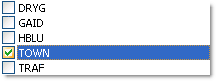
Layers | A list of available layer codes from the raster layers file. Layers are listed only if they are not already contained in the chart. You can select more than one layer not already contained in the chart. Select a check box beside each layer name you want add to the sheet.
|
Procedure
1. Make sure you are in Sheet View
2. Select the Raster Set layer.
3. Select the Create Empty Raster Layers command.
The Create Empty Raster Layers dialog box is displayed
4. Complete the fields in the following table and click OK.