 CARIS HPD Product Editor
 CARIS HPD Product Editor
CARIS HPD Source Editor
CARIS HPD Paper Chart Editor
CARIS Paper Chart Composer
CARIS S-57 Composer
Menu | Edit > Copy > To Feature Layer |
Copy features to a feature layer. You can use this to edit existing features for export to another usage.
Related commands:
• | • |
Interface
Option | Description |
|---|---|
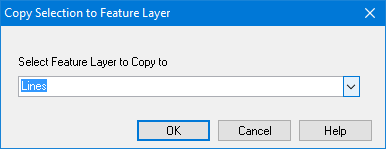
Select Feature Layer to Copy to | The layer that contains the data you want to copy. |
Procedure
1. Select one or more features.
2. Select the Copy to Feature Layer command.
If only one feature layer exists, the selected features are copied directly to it.
If more than one feature layer exists, the Copy Selection to Feature Layer dialog box is displayed.
3. Select a feature layer from the list.
4. Click OK.
The selected features are copied.
If no feature layer exists, the New Feature Layer dialog box is displayed and you can create a layer as described in Create Feature Layer. The selected features are copied to the layer once it is created.