 CARIS HPD Paper Chart Editor
 CARIS HPD Paper Chart Editor
CARIS Paper Chart Composer
Menu | Create > Marginalia > [annotation rule] |
Add margin annotations (marginalia) to a panel border. Marginalia can include text, images, block text and symbols.
Marginalia is positioned using anchor points (acronym: $marga). By default, a border has eight anchor points.
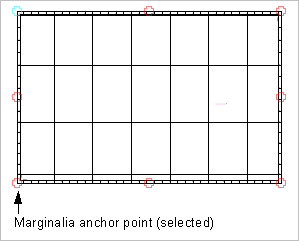
.
Marginalia cannot be added until a border is applied to a panel. |
Anchor points can be moved or deleted. New points can also be added using Create > New Feature > Point.
Annotation information (text, images, etc) is recorded in marginalia annotation template files. These files are organized into annotation rules through the Marginalia Control file (marginaliacontrol.xml)
Marginalia files are located in ...\Program Files\CARIS\HPD\<version>\system\PCEConfig\annotations.
For more information on marginalia template files and annotation rules, see the Portrayal Guide.
When a marginalia rule is selected from the Marginalia command, the information in the marginalia annotation files are added to the anchor points on the panel border.
Related commands:
• • • | • • • |
Procedure
1. In the Layers window, select a Panel data layer.
2. Select the Create Marginalia command.
Marginalia annotations are added to the chart at the marginalia anchor points.