Menu | Tools > Editors > Swath > Filters Tools > HIPS Data Filters > Swath |
Menu | Tools > Editors > Single Beam > Filters Tools > HIPS Data Filters > Single Beam |
Tool |
|
Menu | Tools > Editors > Swath > Filters Tools > HIPS Data Filters > Swath |
Menu | Tools > Editors > Single Beam > Filters Tools > HIPS Data Filters > Single Beam |
Tool |
|
Filter swath or single beam data using various filters including IHO filtering options.
When data is open in either of the editors, the filtering functions can only be activated from the Swath or Single Beam Editor menu or toolbar. When the editors are not open, the filters can be applied from the HIPS Data Filters command or toolbar.
Related commands:
Interface
A customized version of the Filter Observed Depths dialog box is used for both Swath and Single Beam filtering.
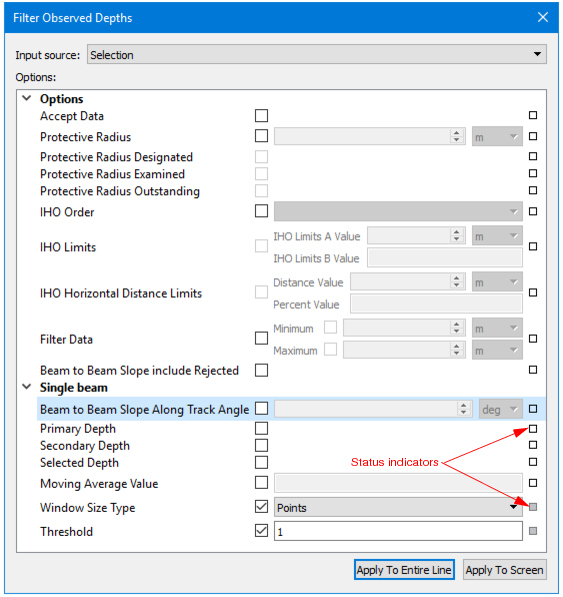
The fields in the dialog box are set to default values. If a setting is changed from the default, the status indicator box for the field changes to grey. Defaults can be restored by clicking on the indicator box and selecting “Reset”.
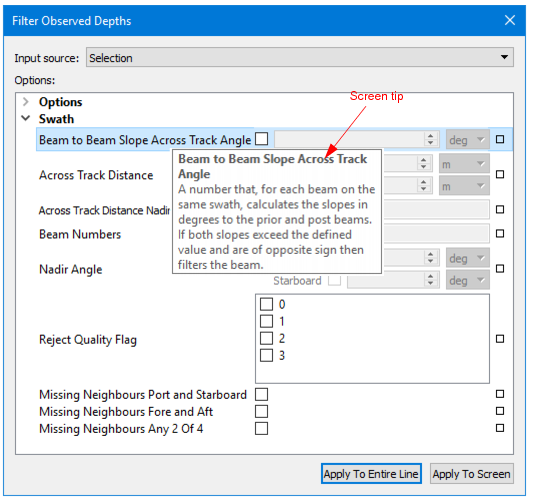
Hover the cursor over a field name to see a short description of the field function in a screen tip
These filters can be applied to a selected line or lines, or to all track lines.
Procedure
1. [Optional] Select track lines.
2. Select a Filter command.
3. Enable the Accept check box to filter in Accepted data. Otherwise all filtered data will be rejected.
4. [Optional] Set options for Protective Radius.
5. [Optional] Set IHO Order options. If S-57 User Defined is chosen, enable the IHO Limits and IHO Horizontal Distance Limits check box, and define values.
6. [Optional] Enable the Filter Data check box and set values in the Minimum and Maximum fields for a range of depths to which filtering will be applied.
7. [Optional] Enable the Beam to Beam Slope include Rejected to include previously rejected soundings when recalculating slopes during multiple runs of the filter.
8. [Optional] Enable Swath or Single Beam options as appropriate, and enter values.
9. Click OK to filter data.
