Menu | Edit > Lines > Smooth and Filter |
Filter and/or smooth lines with tightly curved or angular line segments.
Filtering is based on the Douglas-Peucker algorithm. When using this option, vertices are removed from the lines if they are not necessary. For more information on this algorithm, see Douglas-Peucker Algorithm.
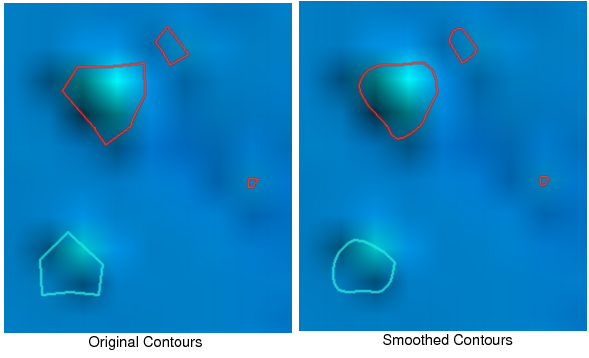
Smoothing is performed using the bSpline algorithm. When using this option, the distance between vertices is shortened by adding additional vertices. By having shorter edges, smoother curves are achieved.
If using both options, the lines are first filtered and the resulting features are then smoothed.
Interface
The Smooth and Filter command uses the following dialog box.
Option | Description |
Filter | This option is used to apply filtering to the vertices in the selected contours. You can choose to filter by metres on the ground or by millimetres (mm) at map scale, which requires you to enter a scale. |
Dopu Filtering Tolerance | The number of units by which to perform Dopu filtering. Enter a value in the field. |
Tolerance Value is | The tolerance type to use for filtering. 1. Select either metres on the ground or mm at map scale. If you choose mm at map scale, a value must be entered in the map scale field. |
Smooth | This option is used to apply smoothing to the selected contours. A bSpline Order value must be specified if using this option. |
bSpline Order | The bSpline Order defines the degree of smoothing you wish to apply. The number must be between 3 and 10. A larger value results in more generalization being performed to create smoother features. |
Procedure
1. Select a feature layer containing line features.
2. Select one or more lines.
3. Select the Smooth and Filter command.
4. Select Filter and/or Smooth.
5. Set any necessary options.
6. Click OK.
The selected line is smoothed/filtered according to the settings defined.
Example
Below is a group of contours that have been smoothed using a bSpline Order of 3.