Additional attributes (that is, attributes available in the source file that are not XY position or Z value) can also be imported. The options for these attributes can be set by adding additional column items to the format information file.
The following additional attribute types are supported:
• String
• Number
• Date
• Time
• Colour
If working with Navigation type files, Date and Time are standard attributes and Z (elevation) is an additional attribute. |
With the above attribute types, the following data types are supported:
• FLOAT - 4 byte real value
• DOUBLE - 8 byte real value
• USHORT - 2 byte unsigned integer value
• SHORT - 2 byte signed integer value
• INT - 4 byte signed integer value
• UINT - 4 byte unsigned integer value
• UCHAR - 8 byte unsigned integer value
• TIME_HOUR - Hour time value
• TIME_MINUTE - Minute time value
• TIME_SECOND - Second time value
• DATE_YEAR - Year date value
• DATE_MONTH - Month date value
• DATE_DAY - Day date value
• STRING - String value
• COLOUR_RED - Red portion of a colour
• COLOUR_GREEN - Green portion of a colour
• COLOUR_BLUE - Blue portion of a colour
• COLOUR_ALPHA - Transparency value of a colour
Examples of several of the types listed can be seen in the sample files provided with the application.
When using an additional attribute with multiple data types, each data type must be defined by the user.
For example, the TIME and DATE attributes each have multiple pieces of data that make up their overall values (hour/minute/second, day/month/year). Each of these pieces of data is a different data type and must be identified individually.
Similarly, to create a single attribute layer called "Colour" in the resulting CSAR file, each of the Red, Green, and Blue portions in the XYZ file are defined separately. The Alpha portion, which is the transparency value, is optional.
When defining properties for sub-values:
• You must complete all fields for each data type in the attribute value as if each value were an attribute itself.
• If a delimiter value is defined, the Start property for each sub-value is relative to the beginning of the column.
• If no delimiter is defined, the Start property is relative to the beginning of the line.
• The width is always the number of characters from the Start property.
Examples of additional attributes can be found in the sample format information files provided in the Sample Data Folder of the CARIS Support Files Guide
These files can be found in the SampleData directory:
C:\ProgramData\CARIS\BASE Editor\<version>\SampleData
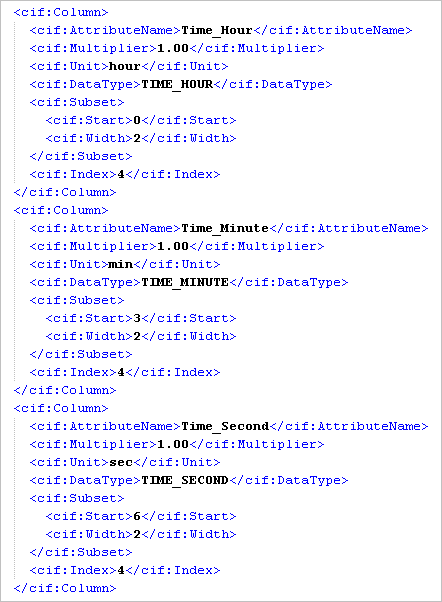
The following example shows TIME_HOUR, TIME_MINUTE and TIME_SECOND, defined using a Column Index and a delimiter.
In order for an import tool to recognize which attribute the data type belongs with, you must identify the DataType of the attribute ("TIME_HOUR") and the Unit of the data ("HOUR").
The same column number is referenced for each piece of data, but a start and width value have been specified for the characters of each piece of data within the column.
When specifying the number of characters this way, the numbering starts over at the beginning of each column.
• TIME_HOUR = Column 4, Start 0, Width 2
• TIME_MINUTE = Column 4, Start 3, Width 2
• TIME_SECOND = Column 4, Start 6, Width 2
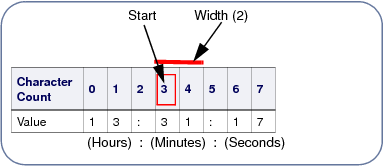
Note that delimiter characters are used between the subset values and are included in the character count for the Start and Width values; however, they are not included in the resulting attribute value. |
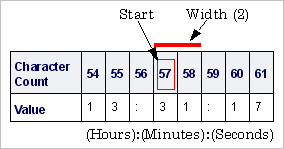
If there were no delimiter value specified in the format information file, each piece of data would need to be identified using the character count of the entire line. For example, TIME_MINUTE may start at character 57 and have a width of 2. TIME_SECOND would then start at 60 with a width of 2.
See the xyz++formatinformationfile.info file for examples of how the other additional attributes are entered.